
A nodemaven alternative is worth considering when you want to control the mobile hardware and IPs instead of buying traffic from a shared provider pool. ProxyKite turns your own Huawei E3372 HiLink dongles and SIM data plans into HTTP and SOCKS5 proxies for a flat US$9 per active dongle each month. NodeMaven suits ready-made mobile IP access with location and quality filters, while ProxyKite suits operators who want to own the connection and resell it.
| Question | NodeMaven | ProxyKite |
|---|---|---|
| What you buy | Access to a managed mobile/residential proxy pool | Software and cloud routing for your own dongles |
| Who owns the mobile IP source | Provider infrastructure | You own the dongle and SIM connection |
| Main billing unit | Proxy traffic and plan tier | US$9 per active dongle per month |
| Data plan | Included in the provider’s service model | Your own SIM data plan; ProxyKite adds no per-GB charge |
| Hardware needed | None from you | Huawei E3372 HiLink and a Raspberry Pi/Linux box are the reference setup |
| Incoming firewall or static IP | Not needed for the buyer | Not needed; the box makes an outbound connection |
| Proxy protocols | Depends on the selected gateway and plan | HTTP and SOCKS5, with shared or separate ports |
| Reseller controls | Account and traffic controls supplied by the provider | Sub-users, quotas, expiry, white-label, exports, and REST API |
ProxyKite: the strongest NodeMaven alternative for dongle owners
ProxyKite is the better fit when the business case is “turn my own 4G connections into a managed proxy service”. The reference build is a Raspberry Pi or Linux box with Huawei E3372 HiLink dongles and a powered USB hub for a larger fleet. The installer handles the software layer, while the cloud router gives each dongle a public proxy endpoint without requiring an open inbound port.
Each dongle supports HTTP and SOCKS5. You can use username-and-password authentication or an IP whitelist. The panel also includes daily, weekly, and monthly bandwidth limits, live traffic insights, website allow/block rules, SIM inbox for carrier messages, webhooks, Telegram alerts, and a web terminal for the box.
Those controls matter when a proxy is part of a real operation rather than a single script. A reseller can create sub-users, assign proxies, set quotas and expiry dates, export credentials, and use white-label options. An agency can separate client access and keep usage visible per account. A developer can use the REST API instead of manually clicking rotation controls.
The price is also simple to model: US$9 per active dongle per month, with no per-GB ProxyKite charge. Customers with 50 or more dongles can ask about volume pricing through contact. There is a 14-day money-back guarantee, including within 14 days of each renewal; you can cancel at any time, and proxies remain available through the paid period.
ProxyKite is built for operators who want to own the mobile connection, choose the SIM, expose multiple dongles, and build a resale or agency workflow around those resources.
What NodeMaven sells, checked November 2, 2026
NodeMaven’s mobile proxy page describes 4G, 5G, and LTE carrier IPs supplied through a provider-operated network. Its mobile and residential products use a unified traffic balance, with plans offered as monthly or pay-as-you-go options. The current page also advertises country, city, ISP, and ZIP-level targeting, automatic rotation, sticky sessions up to 24 hours, and a quality filter.
That is a conventional managed proxy-pool purchase: you select a location or session behaviour, send requests through a gateway, and consume traffic from your balance. You do not need to source a modem, install Linux, choose a SIM plan, or keep a USB hub powered.
The trade-off is the billing unit. Your cost follows the amount of traffic you send through the provider. NodeMaven’s public page currently displays a $3.50 trial and traffic-priced plans; an independent Proxyway review records public plans from $8.50 for 2 GB and rates that fall as the traffic tier grows. Treat those figures as a dated snapshot, not a permanent quote.
That model can be practical for short jobs, global targeting, or teams that need a pool without operating hardware. It is less direct for a proxy operator whose main asset is a rack of local 4G connections and whose customers will consume a lot of traffic.
Shared pool vs your own dedicated dongle
The first question is ownership.
With NodeMaven, the provider operates the mobile infrastructure and gives you an access layer. Your account controls settings such as location, rotation, and session behaviour, but not the physical modem or SIM behind a particular IP.
With ProxyKite, your box connects to your own Huawei E3372 HiLink dongles. Each active dongle becomes a proxy on ProxyKite’s cloud router. You own the hardware, choose the SIM and data plan, and decide where the box runs. The box only needs outbound internet access, so a public static IP and inbound port forwarding are not required.
That last point matters on 4G. Mobile networks commonly place subscribers behind carrier-grade NAT, which makes direct inbound connections difficult. RFC 6598 documents the address space reserved for carrier-grade NAT. ProxyKite’s cloud routing connects outward from your box and exposes the proxy endpoint through the router, so you do not have to fight that topology with a port-forwarding workaround.
If you want to use a proxy immediately without managing a SIM, the managed-pool model is the relevant category. If you want your own carrier connections, the dongle model is the relevant category. A NodeMaven alternative search often mixes both, which makes otherwise neat comparison tables hard to use.
Traffic bill vs SIM data plan
Traffic pricing is easy to understand: estimate requests, select a GB tier, and monitor the balance. It also makes a light or occasional workload simple because you are not assembling a physical proxy farm.
ProxyKite separates the software licence from the mobile data plan. The licence is US$9 per active dongle per month. There are no per-GB charges from ProxyKite, because traffic uses the data plan on your SIM. Taxes are added at checkout, and billing is monthly through Paddle.com, the Merchant of Record.
This is not a promise that mobile data itself is free. You still need a suitable SIM and data plan, and that plan’s carrier rules, coverage, and allowance matter. ProxyKite sells software and cloud routing only; it does not sell SIMs, dongles, IPs, or bandwidth.
The break-even question is therefore operational, not just mathematical. Ask:
- How many active dongles will run each month?
- How much traffic will each SIM plan support for your legitimate workload?
- Do you need one provider-operated pool, or distinct IP sources that you control?
- Will customers use the proxies, making sub-users, quotas, and expiry dates important?
For example, ten active dongles make the ProxyKite software line US$90 per month. Your SIM plans, electricity, hardware, and internet uplink are separate operating costs. That makes the software line straightforward to forecast while leaving the radio network and data spend in your hands.
For a reseller, that separation is useful. You can price access to your own ports and choose how to allocate each SIM’s bandwidth. For an agency, it lets you keep a known local 4G source for a client workflow instead of sharing one traffic balance across unrelated projects.
Control: rotation, sticky sessions, and API
Both models support the two basic behaviours most proxy workflows need: rotate for a fresh connection, or keep a session stable for a sequence of requests. The implementation and level of control differ.
NodeMaven documents automatic rotation and sticky sessions, including sessions that can last up to 24 hours. Its managed gateway also exposes location and quality settings. That is useful when your primary requirement is a particular country, city, ISP, or ZIP-level target from a large pool.
ProxyKite gives each dongle its own proxy endpoint. You can rotate on demand, call a secret rotation link, or set a timer from 60 seconds to 7 days. A sticky option is available when a workflow needs continuity. The rotation result returns the old and new IP, which makes it easier to record a change in an internal job log.
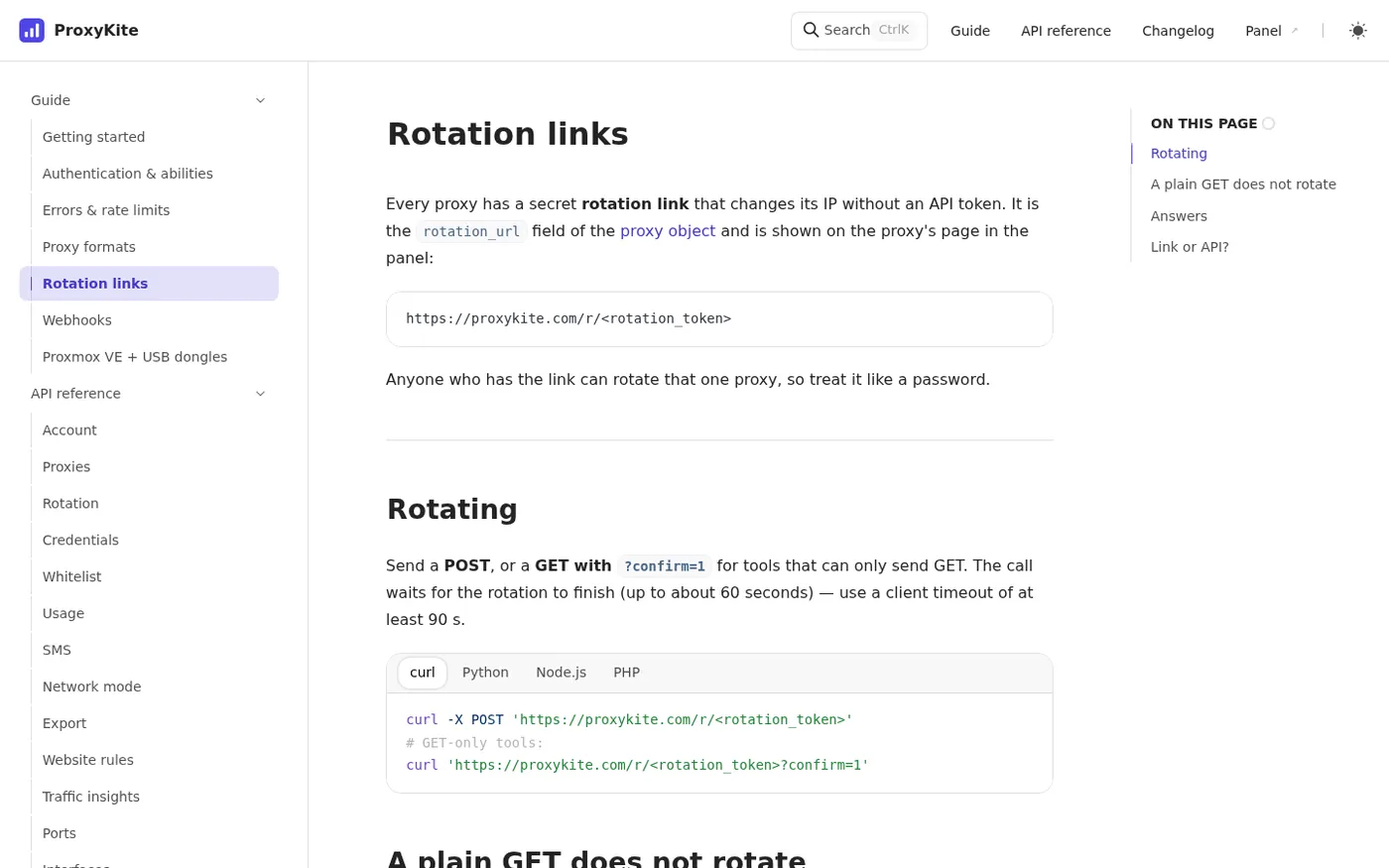
The rotation link is useful for simple automation because it does not require an API token. A POST starts the change, and a GET with ?confirm=1 works with tools that can only send GET requests. Treat the URL like a password: anyone who has it can rotate that proxy.
For larger operations, ProxyKite’s API can list proxies, rotate them, change credentials and whitelists, and read usage, SMS, and rotation history. The API uses scoped tokens with read, rotate, or manage access. Proxy users can be exported as host:port:user:pass, user:pass@host:port, or CSV, which keeps onboarding and customer provisioning practical.
Read how 4G IP rotation works for the network side of a change, then compare it with sticky vs rotating proxies before choosing a session policy. The right choice depends on the application: a login or QA flow often needs continuity, while independent price checks may benefit from fresh exits.
Who should switch from NodeMaven?
Consider ProxyKite if most of these statements are true:
- You already have 4G/LTE dongles or want to build a small proxy farm.
- You want the IP source to be your own SIM connection.
- You prefer a flat software fee over a provider traffic bill.
- Your box sits behind CGNAT or a normal office/home router.
- You need HTTP and SOCKS5 endpoints per dongle.
- You need sub-users, quotas, white-label controls, or a reseller API.
- Your rotation policy is controlled by a timer, a link, or your own script.
Stay focused on the managed-pool comparison when you do not want to buy or operate hardware. In that case, compare location coverage, session settings, traffic terms, authentication, and the provider’s acceptable-use rules. Do not compare a per-GB pool with a per-dongle licence as if they were interchangeable units.
For an operator planning a larger build, start with how to scale a 4G proxy farm from 10 to 100 dongles. If inbound access is the obstacle, CGNAT proxy routing explains why the cloud-router approach is useful.
How to choose a NodeMaven alternative
Use this sequence before you buy:
- Choose the ownership model. Decide whether the provider or your team will supply the mobile IP source.
- Measure traffic. Estimate requests, response sizes, and concurrent jobs. This tells you whether traffic billing or SIM data plans are easier to forecast.
- Define geography. If you need ZIP-level selection from a broad managed pool, record that requirement. If you need the coverage of your own local SIM, test that carrier and location.
- Define session behaviour. Write down whether each job needs a stable session, a timed change, or an on-demand rotation link.
- Plan access control. For resale or client work, require per-user credentials, quotas, expiry, exports, and usage visibility.
- Check the acceptable use policy. Use mobile proxies for legitimate SMM, ad verification, QA, price monitoring, and similar work. Do not use them for fraud, credential attacks, spam, or bypassing platform rules.
The right NodeMaven alternative is the one whose billing unit and ownership model match your workload. For a buyer who wants ready-made access, a managed pool may be the simpler purchase. For a buyer who owns 4G dongles and wants a predictable way to operate or resell them, ProxyKite is the direct fit.
FAQ
Is ProxyKite cheaper than NodeMaven?
They charge for different things. ProxyKite charges US$9 per active dongle per month and does not add a per-GB software charge; your SIM data plan is separate. NodeMaven uses traffic-based plans, so compare your expected GB usage and the cost of owning the dongles before deciding.
Does ProxyKite provide mobile IPs or SIM cards?
No. ProxyKite provides software and cloud routing. You supply the Huawei E3372 HiLink dongles, SIM cards, and mobile data plans, and the resulting proxy IPs come from those connections.
Can I use ProxyKite behind CGNAT?
Yes. The box makes an outbound connection to the cloud router, so you do not need a static public IP or inbound port forwarding. This is one of the main reasons to use the cloud-routing model for mobile connections.
Does ProxyKite support rotating and sticky proxies?
Yes. You can rotate on demand, with a rotation link, or on a timer from 60 seconds to 7 days, and you can use the sticky option when a workflow needs continuity. The API and rotation link let scripts control the change without manual panel work.
Is ProxyKite suitable for a proxy reseller?
Yes. Sub-users, bandwidth limits, expiry dates, white-label options, credential exports, webhooks, alerts, and the REST API are included. Fleets of 50 or more dongles can request volume pricing through the contact page.