
Rotating proxies Python workflows usually use one of two models: cycle through several proxy endpoints, or keep one endpoint and change the mobile IP behind it. This guide shows both with requests, including protected rotation links, timeouts, retries, and checks that tell you which route your request actually used.
Two ways to rotate proxies in Python
The word “rotation” can describe two different changes. Know which one you need before writing the loop.
| Model | What Python changes | Best fit | What stays the same |
|---|---|---|---|
| Proxy-pool rotation | The proxy URL selected for the next request | Independent requests, parallel workers, and a list of owned endpoints | Each endpoint’s own network session |
| Mobile-IP rotation | The mobile data session behind one proxy endpoint | A Raspberry Pi with 4G dongles and a stable client configuration | The proxy host, port, and credentials |
Cycling a list is only a change of route. It does not guarantee that every proxy has a different IP, or that the endpoints have the same quality. An IP rotation link is different: it asks the modem behind one proxy to reconnect, then returns control to the same proxy endpoint after the operation completes.
For both models, rotate between logical jobs. Do not change the source IP halfway through a login, checkout, form submission, or other multi-request workflow that depends on one session.
What you need before you start
Why: separating credentials, proxy traffic, and rotation control prevents the most common implementation mistakes.
You need Python 3, the requests package, and one of these inputs:
- A list of complete HTTP or SOCKS5 proxy URLs for pool rotation.
- One proxy URL plus its private rotation URL for mobile-IP rotation.
- A target URL that you are allowed to request, with a sensible request rate.
Install Requests in the environment that will run the worker:
python -m pip install requestsFor SOCKS5 support, install the optional dependency and use a socks5:// or socks5h:// proxy URL:
python -m pip install "requests[socks]"Keep secrets outside the source file. For example:
export PROXY_URL='http://USER:PASSWORD@proxy.example.net:30007'
export ROTATION_URL='https://proxykite.com/r/ROTATION_TOKEN'
Requests expects a scheme in the proxy URL and a mapping for the target schemes. The Requests proxy documentation shows this http and https mapping. If a password contains @, :, /, or another URL-reserved character, percent-encode the credential before placing it in a URL; using separate credential fields is safer when your client supports them.
Success looks like a script that can read its proxy values from the environment without printing them. Never commit a rotation URL: anyone who has the complete link can rotate that one proxy.
Step 1: Cycle through a proxy pool with Requests
Why: application-level selection lets you choose a new proxy after a connection failure instead of retrying the same broken route.
Start with a small, trusted list. Each entry must be a complete URL, not just host:port:
import itertools
import requests

PROXIES = [
    "http://user_a:password_a@proxy-a.example.net:30007",
    "http://user_b:password_b@proxy-b.example.net:30007",
    "http://user_c:password_c@proxy-c.example.net:30007",
]

proxy_cycle = itertools.cycle(PROXIES)

def get_with_next_proxy(url: str) -> requests.Response:
    last_error = None

    for _ in range(len(PROXIES)):
        proxy_url = next(proxy_cycle)
        proxies = {"http": proxy_url, "https": proxy_url}

        try:
            response = requests.get(
                url,
                proxies=proxies,
                timeout=(10, 30),
            )
            if response.status_code in {502, 503, 504}:
                response.close()
                last_error = RuntimeError(
                    f"proxy returned HTTP {response.status_code}"
                )
                continue

            response.raise_for_status()
            return response
        except (requests.exceptions.ProxyError,
                requests.exceptions.ConnectTimeout,
                requests.exceptions.ReadTimeout,
                requests.exceptions.ConnectionError) as error:
            last_error = error

    raise RuntimeError("all proxy attempts failed") from last_error

response = get_with_next_proxy("https://example.com/")
print(response.status_code, response.url)
The function tries each entry once and returns the first successful response. It treats gateway errors and connection failures as route problems, but it does not rotate on 429 Too Many Requests; a rate limit is a signal to slow down and follow the target service’s rules.
Success means the response was returned through one of the listed endpoints. To see which one was selected, return the proxy_url alongside the response or log a redacted identifier such as proxy-a, never the full URL with its password.
If the list is shared by several threads, protect the iterator with a lock or assign each worker its own list index. A simple global iterator is fine for a single worker, but it is not a complete scheduler for concurrent work.
Step 2: Keep one proxy endpoint and rotate its mobile IP
Why: a stable host and port make client configuration simple while the 4G session behind that endpoint changes between jobs.
A self-hosted mobile setup has two separate URLs:
- Proxy URL: where your Python traffic goes, such as
http://user:pass@proxy.example.net:30007. - Rotation URL: a private control URL that asks that proxy’s mobile connection to rotate.
ProxyKite is designed for customer-owned Huawei E3372 HiLink dongles and a Raspberry Pi or Linux box. The box only needs outbound internet access; it does not need a static IP or an inbound port opened on your network. The cloud route exposes the proxy endpoint while the dongle carries the traffic through its own SIM data plan.
Put the values in environment variables and load them at runtime:
import os

PROXY_URL = os.environ["PROXY_URL"]
ROTATION_URL = os.environ["ROTATION_URL"]

PROXIES = {
    "http": PROXY_URL,
    "https": PROXY_URL,
}
Use the same PROXIES mapping for the target request. Do not send the rotation control request through the proxy that you are rotating; call the HTTPS control URL directly from the worker.
Success looks like a normal target request that uses the same proxy host and port before and after a rotation, while the exit IP observed by a fresh request may change. A carrier can return the same public address after a new session, so your code should record the result instead of assuming every rotation produces a different value.
For background on carrier sessions, CGNAT, and sticky versus rotating workflows, see how 4G IP rotation works. The ProxyKite proxy formats guide covers HTTP and SOCKS5 connection strings.
Step 3: Call a rotation link from Python
Why: checking the structured response gives your worker a clear hand-off between the old IP session and the next request.
Each ProxyKite proxy has a secret rotation link in this shape:
https://proxykite.com/r/<rotation_token>The normal script action is POST. The operation can take longer than an ordinary API request, so use a generous timeout and check both the HTTP status and the JSON ok field:
import os
import requests

rotation_url = os.environ["ROTATION_URL"]

def rotate_mobile_ip() -> dict:
    response = requests.post(rotation_url, timeout=90)
    response.raise_for_status()
    result = response.json()

    if result.get("ok") is not True:
        message = result.get("message", "rotation failed")
        raise RuntimeError(message)

    return result

result = rotate_mobile_ip()
print("rotation completed", result["old_ip"], "->", result["new_ip"])
The response includes the previous and current address. Treat the link like a password: store it in a secret manager or protected environment, redact it from logs, and replace it if it is exposed.
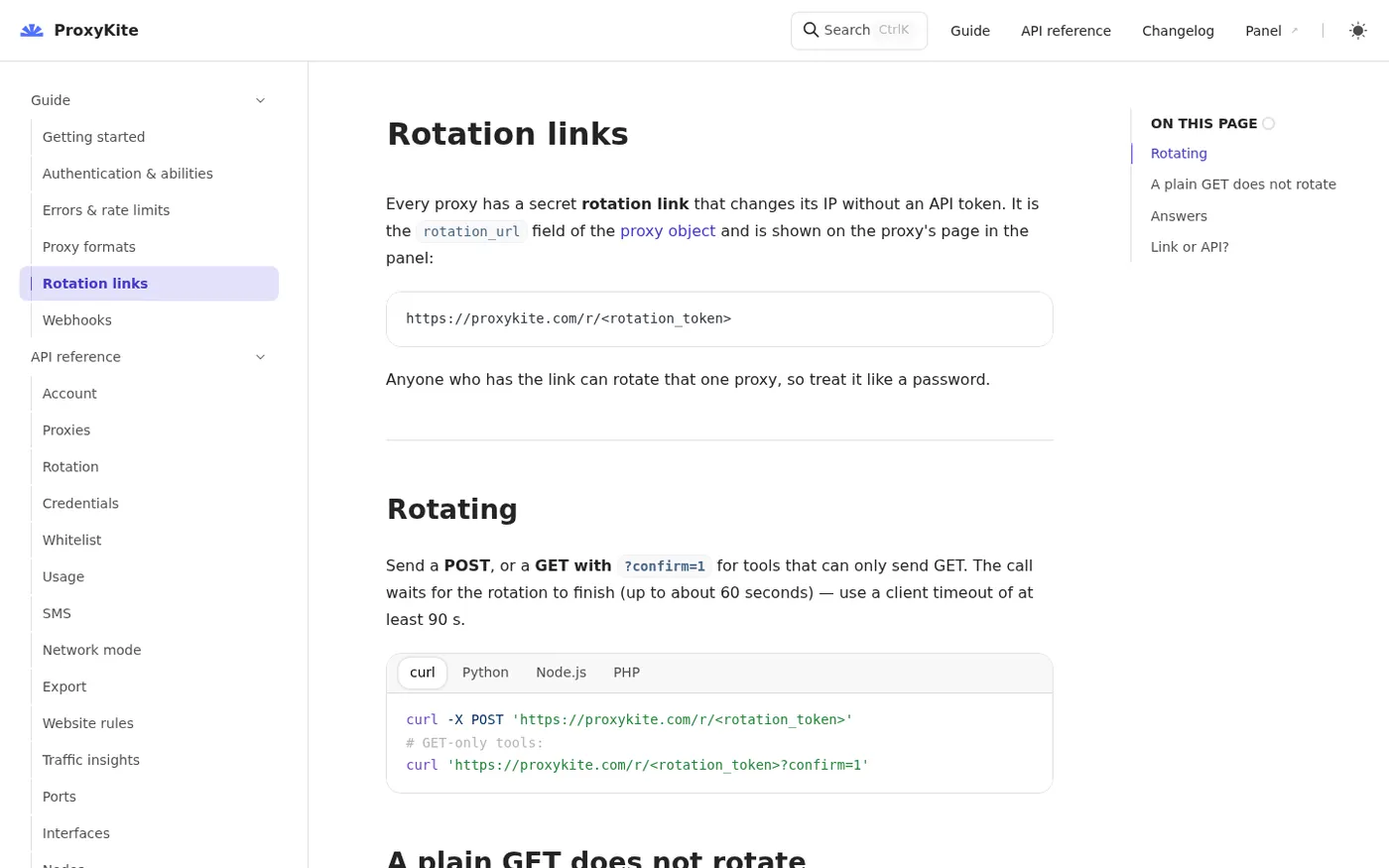
Do not use an unconfirmed plain GET. A browser or link preview can fetch a URL automatically, so ProxyKite requires an explicit action. If a tool can send only GET, add the confirmation parameter:
def rotate_with_get_only() -> dict:
    response = requests.get(
        rotation_url,
        params={"confirm": "1"},
        timeout=90,
    )
    response.raise_for_status()
    result = response.json()

    if result.get("ok") is not True:
        raise RuntimeError(result.get("message", "rotation failed"))

    return result
The rotation request is separate from proxy authentication. Your target request still needs the proxy URL and its user/password or allowlist configuration.
Step 4: Add retries, backoff, and session handling
Why: a retry policy should handle transient target failures without repeating a state-changing rotation or hiding a rate limit.
Requests does not retry failed connections by default. Its documented pattern uses urllib3.util.Retry with an HTTPAdapter:
from requests import Session
from requests.adapters import HTTPAdapter
from urllib3.util import Retry

def build_session() -> Session:
    retry = Retry(
        total=3,
        connect=3,
        read=2,
        status=2,
        backoff_factor=0.5,
        status_forcelist=(502, 503, 504),
        allowed_methods=frozenset({"GET", "HEAD"}),
        respect_retry_after_header=True,
    )
    adapter = HTTPAdapter(max_retries=retry)
    session = Session()
    session.mount("http://", adapter)
    session.mount("https://", adapter)
    return session

session = build_session()
response = session.get(
    "https://example.com/",
    proxies=PROXIES,
    timeout=(10, 30),
)
response.raise_for_status()
The Requests advanced documentation and urllib3 retry reference explain the adapter, allowed methods, status list, and backoff behavior.
There are three important boundaries here:
- The adapter retries the same proxy URL. It does not select the next item in your pool. Use the pool function from Step 1 when the route itself must change.
- Keep rotation calls outside this adapter, or allow only deliberate, application-level retries. A repeated
POSTcan trigger more than one rotation. - Retry idempotent reads such as
GETandHEADonly when the target’s rules allow it. Do not blindly retry a form submission, payment, account change, or other request with side effects.
Pass proxies=PROXIES on each request, even when using a Session. Requests documents that environment proxy variables can override session-level proxy values; explicit per-request values make the route visible in the call. A session still helps reuse connections and cookies, which is useful when a workflow intentionally stays sticky.
Step 5: Verify the new route before continuing
Why: a successful control response proves that the rotation action completed, while a fresh proxied request verifies the path your application actually uses.
Use a small endpoint that returns the caller’s address and make a fresh request through the proxy after rotation. The endpoint below is an example; replace it with an approved diagnostic service in your environment:
import requests

IP_CHECK_URL = "https://api.ipify.org?format=json"

def visible_ip(session: requests.Session) -> str:
    response = session.get(
        IP_CHECK_URL,
        proxies=PROXIES,
        timeout=(10, 30),
    )
    response.raise_for_status()
    return response.json()["ip"]

with build_session() as session:
    before = visible_ip(session)
    rotation = rotate_mobile_ip()
    after = visible_ip(session)

print(f"control response: {rotation['old_ip']} -> {rotation['new_ip']}")
print(f"fresh proxied check: {before} -> {after}")
The useful success condition is that the worker recorded the control response and then made the next request through the intended proxy. before and after may be different, but a same-IP result is not by itself proof of failure: the carrier controls address allocation. If the two values disagree, first confirm that the check used a new request, the correct proxy URL, and the same dongle targeted by the rotation link.
Do not rotate while a sticky session is in progress. Finish the current batch, close or release the session if your application uses one, rotate, wait for the control response, and then start the next batch.
Which model fits your job?
Choose pool rotation when each request is independent and you already control several endpoints. It is easy to scale across workers, and a failed endpoint can be skipped without changing the configuration of the others.
Choose one endpoint with mobile-IP rotation when you own the 4G hardware and want one stable connection string for a script, customer, or reseller workflow. ProxyKite provides HTTP and SOCKS5 access, on-demand and link-based rotation, timers from 60 seconds to 7 days, and a sticky option. The licence is $9 per dongle per month, with no per-GB charge because traffic uses your own SIM data plan.
For a single Raspberry Pi and a few Huawei E3372 HiLink dongles, a rotation link is usually the smallest integration. For a reseller fleet, keep rotation control in your backend and expose only the action each customer is authorised to use; sub-users, quotas, white-label controls, and the REST API are included in the reseller workflow.
Troubleshooting rotating proxies in Python
Every request uses the same IP
Confirm that your code is passing proxies=PROXIES on the diagnostic request and that the proxy URL includes the correct scheme. Then make a new request after the rotation has returned; a reused connection or an environment proxy can make the check misleading.
The rotation call times out
Use a control timeout suited to the rotation operation rather than the shorter timeout used for target pages. Check the HTTP response and JSON error before retrying, and prevent concurrent rotation calls for the same proxy with a per-proxy lock.
A plain GET did not rotate
That is expected. Use requests.post(rotation_url, timeout=90), or add params={"confirm": "1"} to a GET-only call. Do not put the rotation URL in a crawler queue or link-preview system where it can be fetched unintentionally.
SOCKS5 fails but HTTP works
Install requests[socks], confirm that the endpoint supports SOCKS5, and use socks5h:// when DNS resolution should happen through the proxy. Test one request before moving the setting into a worker pool.
Retries make the job too slow
Reduce the retry count only after you have identified the failure class. Keep backoff for transient gateway errors, avoid retrying 429, and remember that the adapter retries the same proxy; switch to pool selection when a different route is the intended recovery.
FAQ
How do I rotate proxies in Python with Requests?
For a pool, put proxy URLs in a list and select the next URL before each request. For one mobile proxy, call its private rotation link separately, check the JSON result, and then send the next request through the same proxy URL.
Can Python rotate a proxy IP without changing the proxy URL?
Yes, when the proxy service exposes a control action that changes the mobile session behind the endpoint. ProxyKite’s rotation link returns the old and new address, so the worker can wait for the operation and verify the next request.
Should I rotate the proxy for every request?
Usually no. Group related requests into a logical job and keep its source address consistent; rotate between jobs when a fresh mobile session is useful. Frequent reconnects add waiting and can interrupt open connections.
Does Requests retry through a different proxy automatically?
No. HTTPAdapter and urllib3.Retry retry the configured route. To change proxies, your application must select another proxy URL, or call a separate mobile-IP rotation action.
Is a same-IP result proof that rotation failed?
No. A carrier can assign the same public address to a new session, and a diagnostic request can accidentally bypass the intended proxy. Check the control response, use a fresh proxied request, and record several runs before changing the setup.