
SOCKS5 vs HTTP proxy is usually a question about compatibility, DNS handling, and the type of traffic your tool sends. For normal browser, API, and web-scraping work, HTTP is often the simplest choice; SOCKS5 is more flexible when the application needs a general TCP relay.
Quick comparison: SOCKS5 vs HTTP
The first decision is usually client compatibility. This table puts the practical mobile-proxy option first, then shows what each protocol is designed to do.
| Option | What it provides | Best fit | Price or setup |
|---|---|---|---|
| ProxyKite per-dongle licence | HTTP and SOCKS5 from the same 4G dongle, with shared or split ports | Operators who own the hardware and need both formats | $9 per dongle per month |
| HTTP proxy | HTTP requests plus CONNECT tunnels for HTTPS | Browsers, APIs, web scrapers, QA, and ad verification | Use an http:// proxy URL |
| SOCKS5 proxy | A general relay for TCP, with a standard UDP mode that may not be enabled by every service | SOCKS-aware desktop apps, SSH tools, and mixed TCP workflows | Use socks5:// or socks5h:// |
ProxyKite can expose both formats from one mobile endpoint, so you can choose the protocol in the client that is actually making the request. Neither protocol automatically encrypts traffic. HTTPS still needs TLS, and the mobile link, target server, connection reuse, and number of active connections matter more to speed than the protocol label.
ProxyKite: both formats from one 4G dongle
For an operator running a Huawei E3372 HiLink stick on a Raspberry Pi or Linux box, the practical advantage is keeping the endpoint choice close to the application. ProxyKite turns each supported dongle into an HTTP and SOCKS5 proxy through its cloud router. The box only needs outbound internet access, so you do not need a static IP or port forwarding to publish the endpoint, including when the mobile connection sits behind CGNAT.
ProxyKite is priced at $9 per dongle per month. Only active dongles are billed, and there is no per-GB charge; traffic uses your own SIM data plan. The licence also includes user/password or IP-whitelist authentication, rotation controls, bandwidth limits, and export formats for your clients.
If you are still planning the hardware, start with the guide to building your own mobile proxy with 4G and Raspberry Pi. For a larger setup, the 4G proxy farm setup guide covers the box, dongles, power, and network layout that sit underneath the protocol choice.
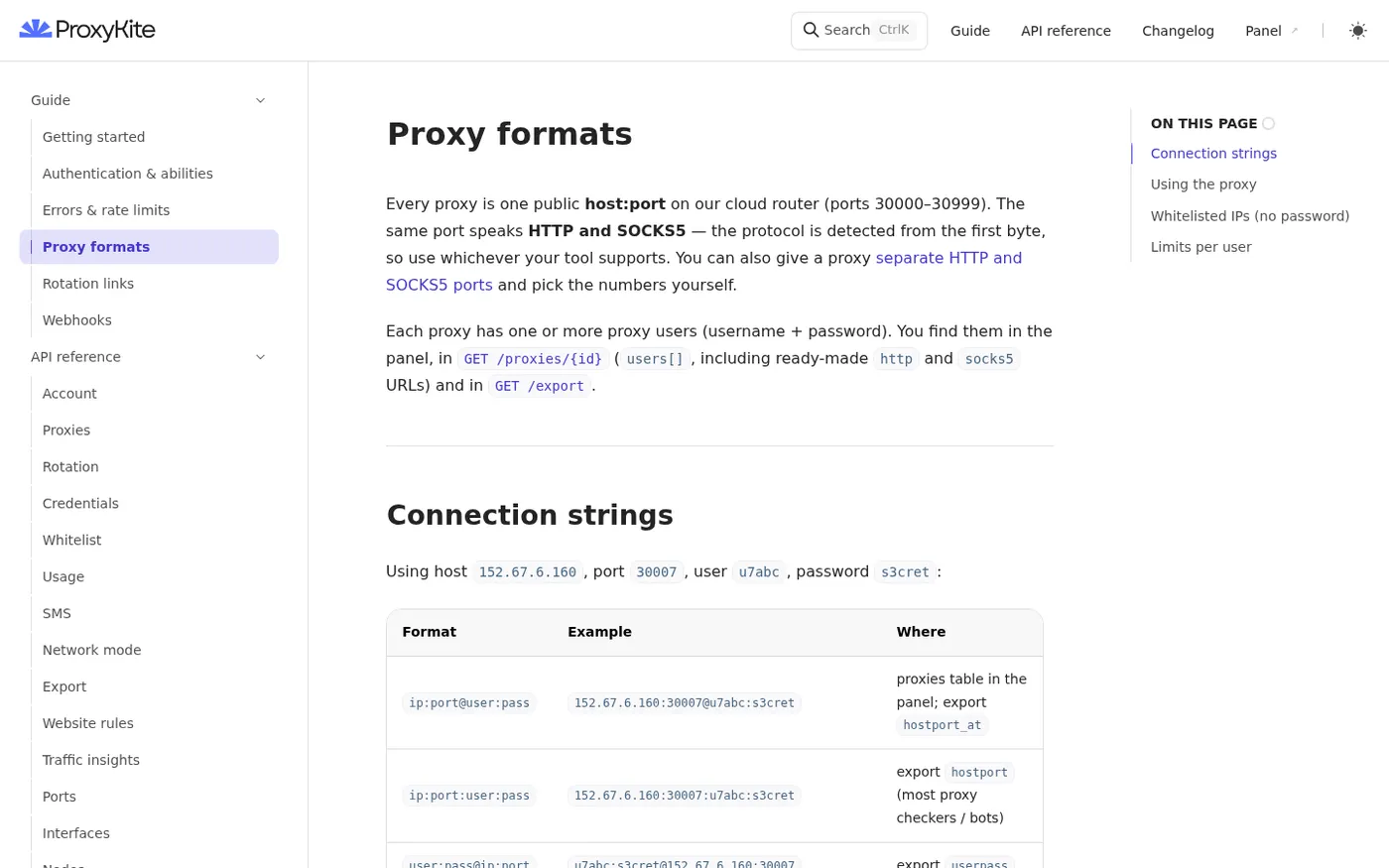
ProxyKite can use one public host:port that detects whether the client starts with HTTP or SOCKS5, or separate HTTP and SOCKS5 ports when a tool requires an explicit endpoint type. See the proxy formats documentation and authentication guide before sharing credentials with a customer.
How an HTTP proxy works
An HTTP proxy understands HTTP messages. For a plain HTTP request, the client sends the request through the proxy, and the proxy forwards it to the destination. HTTP proxy routing is described in RFC 9110’s proxy-routing section.
For HTTPS, the client normally sends a CONNECT host:port request. Once the proxy returns a successful response, it switches to tunnel mode and passes the TLS bytes between the client and the destination. The HTTP proxy does not need to understand the encrypted page contents. RFC 9110 explains the CONNECT tunnel.
That gives HTTP proxies two useful characteristics:
- Web clients tend to support them directly.
- The proxy can apply HTTP-aware rules for traffic that is not inside a TLS tunnel.
The trade-off is scope. An HTTP proxy is designed around HTTP semantics. An application that speaks a different protocol may not know how to use it, even if the underlying connection is TCP.
How SOCKS5 works
SOCKS5 starts with a small handshake. The client selects an authentication method, asks the proxy to connect to a destination, and then exchanges application bytes through the resulting relay. The protocol can represent an IPv4 address, IPv6 address, or a domain name in its request, as specified by RFC 1928.
For TCP work, the common command is CONNECT. The proxy opens the destination connection and relays the stream. SOCKS5 also defines UDP ASSOCIATE, but the protocol capability does not mean every SOCKS5 service enables UDP; the client, proxy, and network path must all support it.
The domain-name detail matters for DNS. In curl, socks5:// resolves the target hostname locally before sending an address to the proxy, while socks5h:// asks the proxy to resolve the hostname. Curl documents the distinction in its SOCKS proxy guide.
That makes socks5h:// the safer starting point when the destination name should be resolved from the proxy side. It also gives you a clear test: run both forms only when you intentionally want to compare local and proxy-side DNS behaviour.
Protocol mechanics that matter
The protocols overlap for HTTPS and other TCP-based work, but they present different interfaces to the client.
| Difference | HTTP proxy | SOCKS5 proxy |
|---|---|---|
| Main model | Understands HTTP requests and can create CONNECT tunnels | Relays connections after a SOCKS5 handshake |
| Best fit | Browsers, APIs, HTTP clients, web scrapers, QA tools | Apps that support SOCKS5, general TCP tools, mixed traffic |
| HTTPS | Uses CONNECT to create a tunnel | Carries the TCP connection through the SOCKS5 relay |
| DNS choice | Depends on the client and proxy behaviour | Explicit in clients such as curl: socks5 or socks5h |
| UDP | Not defined as a general HTTP proxy feature | Defined by SOCKS5, but service support must be checked |
| HTTP-aware filtering | Possible for plain HTTP traffic | Not part of the SOCKS5 relay itself |
| Typical configuration | http://user:pass@host:port | socks5h://user:pass@host:port |
The table is about protocol behaviour, not a speed ranking. A proxy endpoint on a busy 4G link can be slower in either format, and a well-connected endpoint can work well in either format. Measure the exact destination and workload you care about.
Which apps need HTTP and which need SOCKS5?
Browser, API, and web-scraping clients
Start with HTTP when the client has separate HTTP and HTTPS proxy fields or accepts an HTTP proxy URL. This is usually the least surprising setup for browser automation, REST clients, web QA, ad verification, and authorised price monitoring.
For HTTPS targets, confirm that the client supports proxy CONNECT. A client that only sends plain HTTP through an HTTP proxy may fail when it tries to reach an HTTPS URL.
SSH and non-HTTP TCP tools
Use SOCKS5 when the application offers a SOCKS5 setting or when you need to carry a TCP protocol that is not HTTP. The application still needs to support proxying; SOCKS5 is not a universal switch that transparently redirects every process on a machine.
If the application only accepts an HTTP proxy, use the HTTP endpoint instead. If it only accepts SOCKS5, use the SOCKS5 endpoint. When both are available, choose the one with the clearest DNS setting and the simplest authentication configuration.
SMM, QA, and monitoring jobs
For legitimate work on accounts, sites, and data you are authorised to access, HTTP is often convenient because the tools are built around web requests. SOCKS5 is useful when the same workflow includes a desktop client or another application that does not expose HTTP proxy settings.
Keep the job within the target site’s terms and your own account permissions. Changing proxy protocols is a routing choice, not permission to bypass access controls or platform rules.
Test HTTP and SOCKS5 with curl
Testing both protocols against the same destination removes guesswork. Replace the placeholders with one proxy user and one endpoint from your panel. Keep the credentials out of shell history where your environment requires it.
First test the HTTP endpoint:
curl -v \
  --proxy "http://USER:PASS@HOST:PORT" \
  https://api.ipify.org
Then test the SOCKS5 endpoint with proxy-side DNS:
curl -v \
  --proxy "socks5h://USER:PASS@HOST:PORT" \
  https://api.ipify.org
For a basic comparison against a normal HTTPS page, suppress the response body and print the status and total time:
curl -sS -o /dev/null \
  -w 'status=%{http_code} total=%{time_total}s\n' \
  --proxy "http://USER:PASS@HOST:PORT" \
  https://example.com/
Run the same command with socks5h:// if the endpoint supports SOCKS5. A successful test means curl connects, authenticates, completes the proxy handshake, reaches the target, and prints an HTTP status. The two commands may return the same mobile exit IP when they use the same dongle and no rotation occurs; do not treat an IP change as proof that one protocol is faster.
If you deliberately want local DNS for a comparison, change only socks5h:// to socks5://. That is a different test: it changes where the hostname is resolved, not just the proxy protocol.
Shared or split ports?
Use a shared port when your clients already send the correct first bytes for their selected protocol and you want one simple endpoint to distribute. It is convenient for exports and for customers who may choose HTTP in one tool and SOCKS5 in another.
Use split ports when an application insists on a declared proxy type, a team needs separate firewall rules, or you want to label HTTP and SOCKS5 endpoints clearly in your own panel. Split ports do not change the underlying mobile IP; they only give each protocol a distinct connection point.
In either case, keep authentication consistent with the client. ProxyKite supports username/password credentials and IP whitelisting. For a reseller fleet, assign separate users and quotas rather than handing every customer the same credential.
How to choose without guessing
Use this order when deciding:
- Check the application’s supported proxy types. The compatible option wins immediately.
- Identify the traffic. HTTP/HTTPS requests usually fit HTTP; other TCP protocols usually fit SOCKS5.
- Decide where DNS should happen. With curl and SOCKS5, use
socks5h://when proxy-side resolution is the intended behaviour. - Test both formats on the same dongle if both are supported. Compare success rate, DNS results, response time, and how the application handles retries.
- Keep the endpoint and authentication format documented for each customer or automation job.
For a 4G proxy farm, the choice is usually per client, not per dongle. That is why having both formats available on the same mobile endpoint is more useful than trying to declare one protocol the universal winner.
FAQ
Is SOCKS5 faster than an HTTP proxy?
Not as a general rule. For HTTPS, both can create or carry a tunnel, and the mobile link, target server, connection reuse, and workload usually have a larger effect than the protocol label. Test the exact endpoint with the exact client.
Is SOCKS5 more secure than HTTP?
SOCKS5 is not encryption, and an HTTP proxy is not automatically insecure. HTTPS provides TLS for the application traffic; the proxy protocol mainly changes how the client asks for the connection and where HTTP semantics are handled.
Should I use HTTP or SOCKS5 for web scraping?
Use the type your scraper supports best. HTTP is a practical starting point for ordinary HTTP/HTTPS requests, while SOCKS5 can be useful when the scraper or surrounding toolchain needs a general TCP proxy. For curl, choose socks5h:// when you want the proxy to resolve the hostname.
Can one mobile proxy support both HTTP and SOCKS5?
Yes, when the proxy software exposes both interfaces. ProxyKite supports HTTP and SOCKS5 from each active dongle, with a shared host and port or separate ports depending on the client’s requirements.
Does changing from HTTP to SOCKS5 change the mobile IP?
Not by itself. If both connections use the same dongle and no rotation occurs, they can use the same mobile exit IP. Rotation settings, reconnects, and the carrier network determine when the IP changes.