
A static mobile proxy is usually a 4G or 5G proxy kept on one carrier IP for a defined session, not an IP address the carrier promises will stay unchanged forever. The practical way to get that behaviour is to dedicate one dongle to the workflow, turn off intentional rotation, and understand what happens when the carrier reconnects the data session.
Can a mobile IP really be static?
The short answer is: it can be stable, but “static” needs a precise definition.
With a mobile connection, the carrier assigns the modem an address or a carrier-side translation mapping. That assignment can change when the modem reconnects, loses service, is rebooted, or is moved through the carrier’s network. A proxy platform can avoid asking for a new address, but it cannot force the carrier to preserve an address through every network event.
That is why there are three different meanings hiding behind the word static:
| Term | What stays consistent | What can still change |
|---|---|---|
| Static mobile proxy | A mobile endpoint is kept on the same address for the intended session | The carrier can replace the address after a reconnect or network event |
| Sticky mobile proxy | Your traffic stays on the same selected endpoint until the session or rule changes | The carrier-side IP may change underneath the endpoint |
| Dedicated mobile proxy | One customer gets exclusive use of a dongle or proxy endpoint | The dongle’s carrier IP is still not automatically permanent |
For a workflow that needs one recognisable source for several hours or days, the useful promise is usually “no platform-triggered rotation during this session.” Ask the provider whether the guarantee covers the proxy port, the device, the session, or the carrier IP itself. Those are not the same thing.
ProxyKite is designed around the part you can control: your own Huawei E3372 HiLink dongle and SIM, connected to a Raspberry Pi or Linux box. You can leave rotation off, use a sticky setting, or set a timer from 60 seconds to 7 days. The carrier remains responsible for the mobile address.
Dedicated vs shared mobile proxies
“Dedicated” answers a different question from “static.” It tells you who is allowed to use the endpoint, while static or sticky describes how often the route changes.
A shared mobile proxy may send several customers through the same dongle or carrier connection. Even if the provider does not rotate on every request, another user can affect the connection’s traffic pattern and the endpoint may not fit an IP allowlist workflow.
A dedicated mobile proxy gives one customer control of one endpoint. For your own farm, that endpoint is normally one SIM in one dongle. You decide which customer, browser profile, account, or internal job uses it. That makes it easier to keep one workflow on one route and to audit its traffic.
The clean model is:
- Assign one dongle to one customer or job.
- Use one proxy port and one authentication rule for that assignment.
- Disable scheduled or link-based rotation while the job needs continuity.
- Check the observed exit IP at the start of a run and after any reconnect.
If you are building the hardware side from scratch, the guide to building a mobile proxy with 4G and Raspberry Pi covers the wider farm layout. This article focuses on keeping an endpoint steady once the dongle is online.
Sticky sessions: timer up to 7 days and no auto-rotation
A sticky session is a routing rule that keeps requests on the same selected mobile endpoint for a period. It is useful for login flows, social media work for accounts you own or manage, browser sessions, ad verification, and long-running price checks where an address change would make the result harder to interpret.
There are three common controls:
| Control | Behaviour | Good fit |
|---|---|---|
| No intentional rotation | The route is left alone until you change it or the carrier changes it | Long browser sessions and IP allowlists |
| Timer | The platform asks for a new route at a chosen interval | Jobs that need predictable, periodic changes |
| Rotation link or API | Your application requests a change when its work unit ends | Scraping batches, QA runs, and controlled workflows |
ProxyKite supports on-demand rotation, a rotation link, and timers from 60 seconds to 7 days, with a sticky option. The long timer is useful when your definition of “static” is “do not rotate this endpoint during my work window.” It is not a statement that a carrier will never issue a new address.
For a stable run, choose the dongle and session first, then avoid calling the rotation link from a health check or worker retry loop. A common mistake is to put rotation into the same script that checks whether the proxy is alive. A failed request should trigger a retry or inspection, not automatically create a new identity unless that is your intended recovery policy.
What still changes your IP?
Even with rotation disabled, a mobile IP can change for reasons outside the proxy control plane:
- Carrier reconnect: the mobile data session is released and established again.
- Signal loss: the dongle loses radio service long enough for the data session to be rebuilt.
- Power or USB events: a reboot, an unpowered hub, or a loose connection takes the modem offline.
- Carrier maintenance or policy: the carrier changes routing or address assignment.
- Manual action: you reboot the dongle, toggle the connection, or request rotation.
CGNAT makes the boundary easy to miss. The IETF reserves 100.64.0.0/10 as shared address space for carrier-grade NAT, and describes it as provider-side space rather than globally routable Internet space in RFC 6598. In RFC 6888, the IETF defines CGN as a NAT function that shares an IPv4 address among subscribers and notes that subscribers have limited or no control over it.
That does not prevent you from hosting a usable proxy behind CGNAT. It means inbound connections should not depend on the dongle having a public, fixed address. ProxyKite uses outbound connectivity from your box to provide the cloud-routed proxy endpoint, so you do not need a static IP or open inbound port on the mobile connection.
When the carrier changes the exit address, the right response is to treat it as a new network state. Recheck the IP, confirm that the session is still authenticated, and decide whether the job can continue with the new address. For an IP-allowlisted service, update the allowlist or pause the job until the endpoint is approved again.
Static ISP proxies vs your own 4G dongle
Static ISP proxies and static mobile proxies solve different problems.
A static ISP proxy is associated with an ISP or business broadband network and is normally sold as a provider-managed address that remains assigned for a longer term. A mobile proxy exits through a SIM and cellular network. Its value is the mobile network identity and the control of a physical modem, not a promise that the address is permanently fixed.
| Question | Static ISP proxy | Own 4G dongle with ProxyKite |
|---|---|---|
| Who owns the connection? | The proxy provider | You own the SIM, data plan, dongle, and box |
| What controls the route? | Provider allocation and session rules | Your dongle plus your rotation settings |
| Can the carrier-side address change? | Depends on the ISP and product | Yes, after mobile reconnects or other carrier events |
| Does CGNAT block hosting? | Product-specific | No inbound port is required from the dongle side |
| How is cost measured? | Provider plan terms | US$9 per active dongle per month, with no ProxyKite per-GB charge |
Choose the mobile route when you need your own carrier connection, your own geography, or control over the hardware and SIM. Choose a static ISP product when the task specifically requires a provider-assigned fixed address and does not need a cellular exit.
Do not treat either label as a guarantee that a website will accept every request. You still need to follow the destination’s rules and use the proxy for legitimate work such as your own or clients’ social accounts, ad verification, QA, and price monitoring.
Setting a long sticky session in ProxyKite
The exact dashboard labels can change, but the operating sequence is stable:
- Prepare one endpoint. Connect a Huawei E3372 HiLink or similar supported HiLink dongle to your Raspberry Pi or Linux box. Use a powered USB hub when the box has several dongles.
- Assign the dongle. Keep this dongle mapped to the customer, account group, or job that needs continuity. Avoid sharing it with unrelated work.
- Create the proxy. Use the generated HTTP or SOCKS5 endpoint and choose either user/password or IP-whitelist authentication.
- Set the rotation policy. Select the sticky option or leave intentional rotation off. If the interface requires a timer, choose the longest available period, up to 7 days.
- Record a baseline. Make one request through the proxy and save the returned IP, timestamp, endpoint, and job identifier in your own run log.
- Test the workflow. Log in to the permitted service or start a small QA/monitoring batch before committing a long job.
The ProxyKite rotation-links guide shows the control used to request a deliberate change. The screenshot below is useful when you are checking that your long-session configuration is separate from the rotation action.
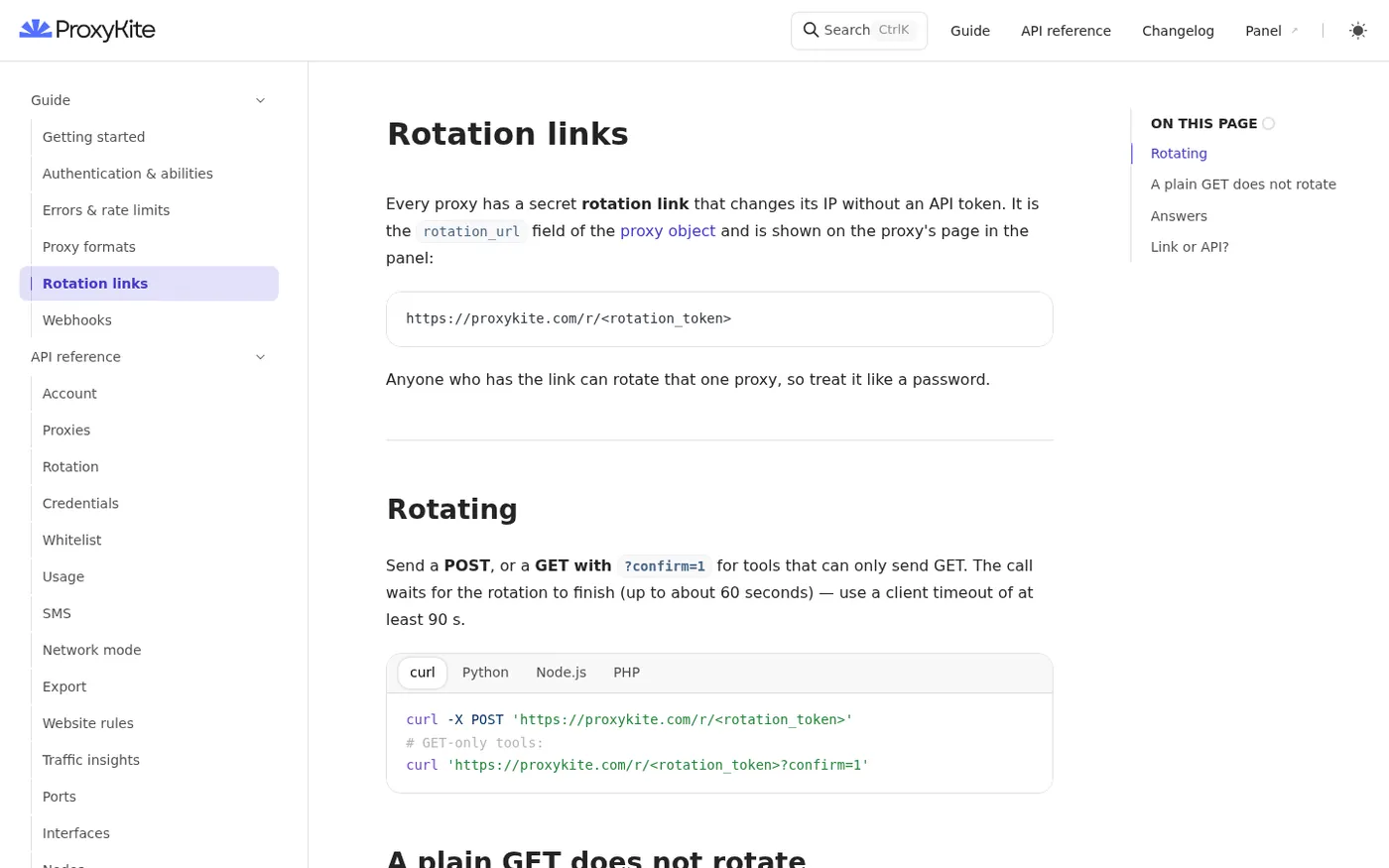
You can also automate deliberate changes through the rotation API. Keep that call outside the normal request path. For example, your worker can rotate between completed batches, then wait for the new IP before starting the next batch. It should not rotate merely because one destination returned a timeout.
When you should rotate anyway
Static behaviour is useful only while the current route is useful. Rotate deliberately when:
- a completed batch should begin with a fresh carrier address;
- a test needs to compare responses from two separate mobile sessions;
- your monitoring job has finished its observation window;
- an allowlist or customer assignment has changed;
- the current IP is no longer suitable for the permitted workflow and your policy allows a new session.
Do not rotate to evade a platform restriction, bypass a ban, or conceal abusive automation. A rotation control is an operations feature, not permission to ignore a site’s terms or applicable law.
For a long-running job, add a simple observation loop instead of a blind rotation loop. Check the endpoint, timestamp the result, and alert when the observed IP changes. ProxyKite includes live traffic insights, webhooks, Telegram alerts, and bandwidth limits, so you can monitor the endpoint without turning every alert into an automatic identity change.
FAQ
Is a static mobile proxy truly permanent?
Usually, no. In practical proxy terminology, static often means that the provider does not intentionally rotate the selected mobile route during the session or plan period. The carrier can still change the IP after a reconnect, signal event, reboot, or carrier-side change.
How long can a 4G proxy keep one IP?
There is no universal duration because the carrier controls the mobile data session. ProxyKite can keep its own rotation policy on a timer from 60 seconds to 7 days, or use a sticky option, but that setting does not override a carrier reconnect.
Is a dedicated mobile proxy the same as a static mobile proxy?
No. Dedicated means the endpoint or dongle is reserved for one customer or workflow. Static or sticky describes how the route is rotated. A dedicated dongle can still receive a new carrier IP, and a sticky rule can still be shared if the provider has not given you an exclusive endpoint.
Can I run a static mobile proxy behind CGNAT?
Yes, if the proxy software uses an outbound connection rather than requiring inbound port forwarding to the dongle. ProxyKite’s cloud router is designed for this model, so the box needs outbound Internet access; it does not need a static public IP or an open inbound port.
What should I do when the IP changes unexpectedly?
First check whether the dongle, USB power, signal, or data session was interrupted. Then verify the current exit IP through the proxy, update any permitted allowlist if required, and decide whether to continue or intentionally rotate. Record the event so you can distinguish carrier changes from a rotation link or timer action.