
A proxy format is the arrangement of a host, port, username, and password in a string that a tool can read. The values stay the same; only their order, separators, and optional protocol prefix change.
The four common formats
Start by separating the data from the spelling. A working proxy usually has four values:
- Host: a domain name or IP address for the proxy endpoint.
- Port: the decimal TCP port exposed by that endpoint.
- Username: the account or proxy user used for authentication.
- Password: the secret paired with that username.
Assume these example values throughout this guide:
host = proxy.example.net
port = 30007
username = u7abc
password = s3cret
The same values can appear in several compact forms:
| Format | Example | What it means |
|---|---|---|
host:port | proxy.example.net:30007 | Endpoint without inline credentials |
host:port:user:pass | proxy.example.net:30007:u7abc:s3cret | Common bulk-export format |
host:port@user:pass | proxy.example.net:30007@u7abc:s3cret | A dashboard-specific connection string |
user:pass@host:port | u7abc:s3cret@proxy.example.net:30007 | Credential-before-endpoint form |
The first format needs authentication entered somewhere else. The other three put the credentials in the same line, but they do not mean that the proxy itself is different. They are serializations of the same endpoint.
You may also see a protocol prefix:
http://u7abc:s3cret@proxy.example.net:30007
socks5://u7abc:s3cret@proxy.example.net:30007
This is the URL-style form. http:// or socks5:// tells a URL-aware client which proxy protocol to use. It is not the protocol of the website you are visiting. An HTTPS target can still be reached through an HTTP proxy; the client uses the proxy to establish the connection.
ProxyKite provides HTTP and SOCKS5 access for each active dongle. Its proxy formats documentation shows the available connection strings and exports, including the compact forms and ready-made protocol URLs.
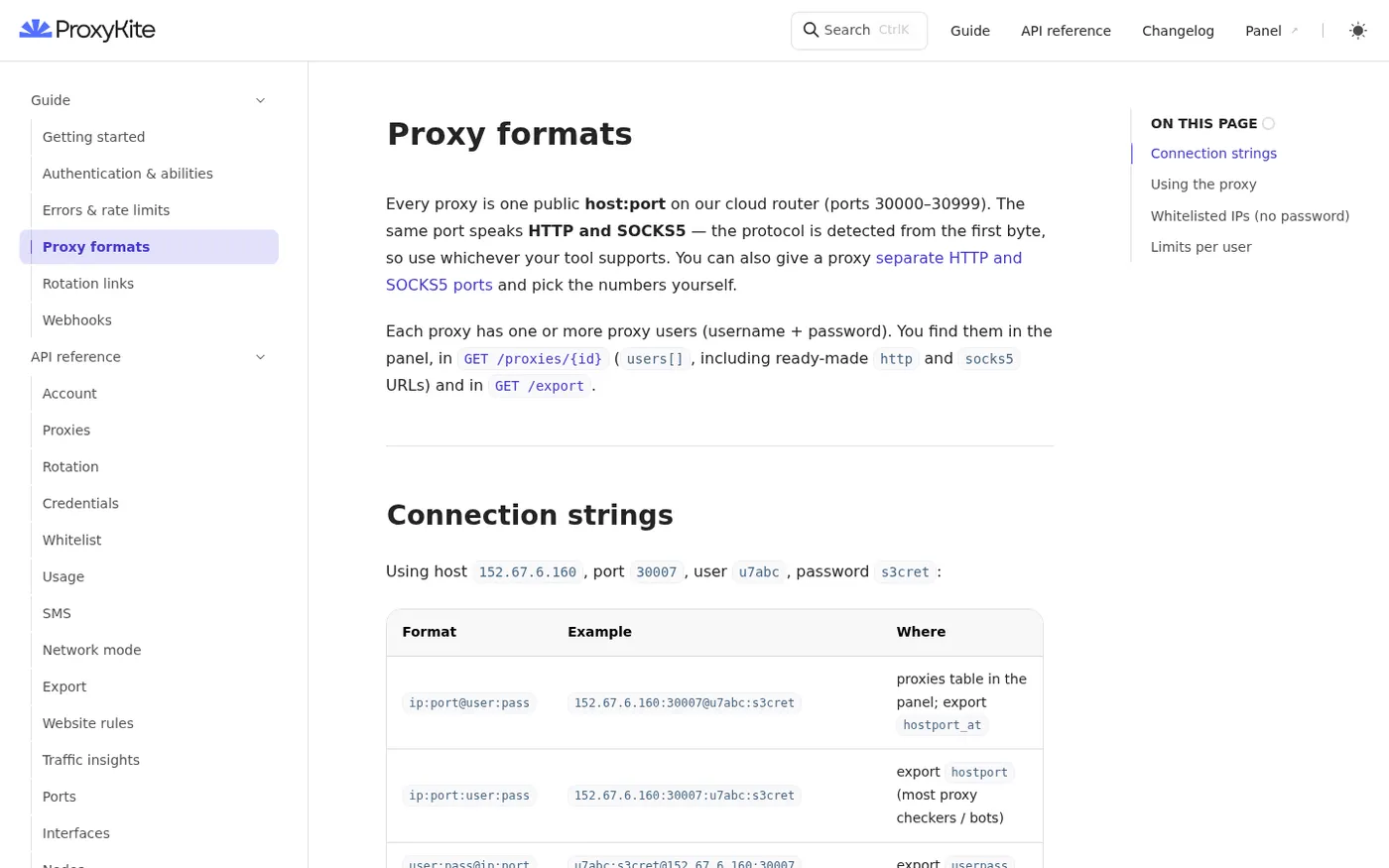
The protocol and the credentials are separate decisions. Choose HTTP when your client expects an HTTP proxy, and choose SOCKS5 when the client supports SOCKS5 and you need that proxy protocol. Do not change http:// to socks5:// unless the endpoint and client support both.
Which tools want which format
Most failed proxy tests are parsing errors. The endpoint is reachable, but the application reads u7abc as the host, treats 30007 as a username, or receives credentials in a field that does not support them.
Use this mapping as a starting point, then check the exact field labels in your client:
| Tool or setting | Usually accepted | Practical setup |
|---|---|---|
curl | URL or separate proxy and auth arguments | Use --proxy with --proxy-user |
| Python Requests | URL with a scheme | Put the URL in the http and https proxy entries |
| Browser or desktop app | Separate fields | Enter host, port, username, and password individually |
| Environment variables | URL with a scheme | Set HTTPS_PROXY, HTTP_PROXY, or ALL_PROXY |
| Bulk importer | Its documented line order | Test one row before importing the full list |
For a curl check, keep the secret in the authentication option instead of putting it in the URL:
curl --proxy 'http://proxy.example.net:30007' \
  --proxy-user 'u7abc:s3cret' \
  'https://example.com/'
The official curl proxy guide documents HTTP and SOCKS proxy options and proxy authentication. For SOCKS5, use the client’s SOCKS option or a URL with the correct scheme:
curl --socks5-hostname 'proxy.example.net:30007' \
  --proxy-user 'u7abc:s3cret' \
  'https://example.com/'
Python Requests expects a URL in its proxy dictionary. Its documentation also notes that SOCKS support needs the optional requests[socks] dependencies:
import requests

proxy_url = "http://u7abc:s3cret@proxy.example.net:30007"
proxies = {
    "http": proxy_url,
    "https": proxy_url,
}

response = requests.get("https://example.com/", proxies=proxies, timeout=30)
print(response.status_code)
The Requests proxy documentation shows the same http and https mapping and the URL form for HTTP Basic authentication. For a SOCKS5 endpoint, use socks5:// in both values after installing the optional support.
In a browser or GUI application, do not paste the complete URL into the host field unless the application explicitly says it accepts a proxy URL. Enter proxy.example.net as the host, 30007 as the port, and the two credentials in their own fields. If there is a protocol selector, set it to HTTP or SOCKS5 instead of adding the scheme to the hostname.
If you run a Raspberry Pi proxy box, the same rule applies to scripts and services on the box. Keep a canonical record with five columns—protocol, host, port, username, and password—and render the format required by each client at the edge. That avoids maintaining several hand-edited copies of every proxy line. The guide to building a mobile proxy with 4G and Raspberry Pi covers the hardware and software context behind those endpoints.
Converting between formats
Conversion means rearranging fields. It does not rotate the IP, change the protocol, or create a new credential.
For a simple host:port:user:pass line, this shell snippet creates the user:pass@host:port form:
line='proxy.example.net:30007:u7abc:s3cret'
IFS=: read -r host port user pass <<< "$line"
printf '%s@%s:%s\n' "$user:$pass" "$host" "$port"
Expected output:
u7abc:s3cret@proxy.example.net:30007The last variable receives the remaining text, so this pattern can retain a colon in a password. It is not suitable for an IPv6 host because an unbracketed IPv6 address already contains colons. Use the URL form with an IPv6 host in square brackets instead:
http://u7abc:s3cret@[2001:db8::10]:30007To add an HTTP scheme to a line whose credentials contain URL-sensitive characters, encode the username and password while leaving the host and port alone:
python3 -c 'import sys; from urllib.parse import quote; h,port,user,pw=sys.argv[1].split(":",3); print("http://{}:{}@{}:{}".format(quote(user,safe=""),quote(pw,safe=""),h,port))' \
  'proxy.example.net:30007:u7abc:s3cret'
Change only the scheme when you need a SOCKS5 URL:
socks5://u7abc:s3cret@proxy.example.net:30007For host:port@user:pass, split at @ first, then split the endpoint at its final colon. For user:pass@host:port, split at @ first and split the credentials at their first colon. That order matters because a password can itself contain a colon.
If the source is a CSV file, do not use a colon-based shell parser blindly. Read the columns by their header names, preserve quoted values, and write the target format only after validating that host and port are present. A conversion script should reject a malformed row rather than silently producing a line that points to the wrong port.
Special characters in passwords
The compact colon formats are not interchangeable with URL syntax. In a URL, : separates username from password, @ separates credentials from the host, and #, /, and ? have meaning elsewhere in the URI. A literal character in the password must be percent-encoded when it appears inside the URL.
| Character in a credential | URL form |
|---|---|
@ | %40 |
: | %3A |
/ | %2F |
# | %23 |
% | %25 |
| space | %20 |
For example, the raw password pa@ss:word/# becomes pa%40ss%3Aword%2F%23 in a URL:
http://u7abc:pa%40ss%3Aword%2F%23@proxy.example.net:30007Encode each credential once. Do not encode the host, port, or the entire URL, and do not paste an already encoded value into a function that encodes percent signs again. In a GUI field or a curl --proxy-user argument, enter the raw password unless that tool’s documentation specifically asks for URL encoding.
URL credentials are convenient but easy to expose. They can appear in shell history, process listings, application logs, browser history, or an exception trace. RFC 3986 defines the generic authority shape as [userinfo@]host[:port] and warns about putting secret usernames or passwords in URIs; read the RFC 3986 security guidance before storing proxy URLs in shared configuration.
For production jobs, prefer a secret store or a protected environment/configuration file. If a client offers separate username and password fields, use them. After a credential appears in a public log or repository, rotate that proxy user rather than assuming the log is private.
Exporting lists as CSV
CSV is useful when a proxy list moves between a panel, a spreadsheet, and an internal provisioning script. It is not a universal proxy format: agree on column names and protocol values before importing it.
A practical schema is:
| protocol | host | port | username | password |
|---|---|---|---|---|
| http | proxy.example.net | 30007 | u7abc | s3cret |
| socks5 | proxy.example.net | 30007 | u7abc | s3cret |
Keep the protocol as data rather than assuming every port is HTTP. A single endpoint may support both protocols, or a fleet may use separate HTTP and SOCKS5 ports. Your importer should validate the protocol against the client’s supported values and treat the port as an integer.
Here is a local Python example that writes one authenticated HTTP row and one SOCKS5 row. Replace the placeholder values from your own protected input; do not commit the output file to a public repository.
import csv

rows = [
    {
        "protocol": "http",
        "host": "proxy.example.net",
        "port": 30007,
        "username": "u7abc",
        "password": "s3cret",
    },
    {
        "protocol": "socks5",
        "host": "proxy.example.net",
        "port": 30007,
        "username": "u7abc",
        "password": "s3cret",
    },
]

with open("proxies.csv", "w", newline="", encoding="utf-8") as file:
    writer = csv.DictWriter(file, fieldnames=rows[0].keys())
    writer.writeheader()
    writer.writerows(rows)
When importing CSV into a tool that wants host:port:user:pass, render each row as host:port:user:pass. When it wants a URL, render scheme://user:pass@host:port and percent-encode the username and password first. When it offers separate fields, use the CSV columns directly.
Common proxy-format mistakes
The error message often points at the wrong layer. Check the parser before changing SIMs, rotating the connection, or rebuilding the client.
| Symptom | Likely formatting mistake | Fix |
|---|---|---|
| Hostname lookup fails for a username | You pasted user:pass@host:port into a host-only field | Split the fields or use the client’s URL field |
Authentication fails with a password containing @ | The @ ended the userinfo early | Percent-encode it as %40 in a URL |
| Client says the port is invalid | You supplied host:port:user:pass where it expects host:port@user:pass, or vice versa | Match the importer’s documented order |
| HTTP works but SOCKS5 does not | The scheme or protocol selector is wrong, or SOCKS support is missing | Select SOCKS5 and verify the client supports it |
| IPv6 line is split into too many fields | You used colon-separated syntax for an IPv6 host | Use scheme://user:pass@[IPv6]:port |
| A proxy works in curl but not in an app | Curl used separate auth flags while the app expects one URL or separate fields | Recreate the same protocol, endpoint, and credentials in the app’s schema |
Test with one line first. Confirm the client is actually using the proxy by checking the request’s egress address with an approved IP-echo endpoint, then add the rest of the list. A successful TCP connection to the host and port proves reachability, not authentication or correct traffic routing.
FAQ
What is the correct proxy format?
There is no single universal line format. Common choices are host:port:user:pass, host:port@user:pass, user:pass@host:port, and a URL such as http://user:pass@host:port. Use the exact order your client documents.
Is host:port:user:pass the same as user:pass@host:port?
They can describe the same host, port, username, and password, but they use different separators and field order. Convert them only after checking whether the password contains a colon or another delimiter.
Should I use an HTTP or SOCKS5 proxy format?
Use HTTP when the client asks for an HTTP proxy, and use SOCKS5 when the client supports SOCKS5 and your endpoint is configured for it. The format alone does not change the underlying proxy protocol; the scheme or protocol field tells the client what to speak.
Why does a proxy password fail when I put it in a URL?
Reserved characters such as @, :, #, and / can be read as URL delimiters instead of password characters. Percent-encode those characters in the username or password portion, or use separate credential fields.
Can I put proxy credentials in a CSV file?
Yes, if the importer supports CSV and you protect the file. Use explicit columns for protocol, host, port, username, and password, quote values according to CSV rules, and remove the file from shared logs and repositories.
For the exact connection strings supported by ProxyKite, see the proxy formats guide and the authentication guide.