
Sticky vs rotating proxies is a choice between keeping one mobile route for a workflow and asking for a new route between jobs or on a schedule. With one 4G dongle, sticky means no intentional rotation until you trigger one or a timer fires; rotating means the dongle reconnects and may receive a different carrier IP.
The short answer
Use a sticky session when the target needs to connect several requests: a login, a multi-step form, a browser session, or a checkout test. Use rotation when each request or batch is independent, such as price snapshots, ad verification checks, or separate public pages.
The choice is about continuity, not which mode sounds more advanced. A workflow that carries cookies, tokens, cursors, or account state usually needs one source address for its complete sequence. A workflow that can start each request from scratch can rotate between requests or batches.
| Your workflow | Better starting mode | Why |
|---|---|---|
| Login and then visit several account pages | Sticky | Keeps the sequence on one route |
| Submit a multi-step form | Sticky | Reduces the chance of a source change between steps |
| Check one public product page at a time | Rotating | Each fetch can be independent |
| Run an ad-verification check from a chosen mobile exit | Sticky or on-demand | Keep the check together, then rotate before the next test |
| Collect many independent public pages | Rotating | A new session can separate batches |
| Keep one route for a long-lived allowlist | A stable route or static option | A timed mobile session is not a permanent IP guarantee |
What the two terms mean
A rotating proxy changes the exit path according to a rule. That rule might be every request, after a batch, when you call a rotation link, or when a timer reaches its interval. A sticky proxy keeps traffic associated with one selected route for the session or period you chose.
These terms describe routing behaviour. They do not automatically describe the source network, the country, the protocol, or whether an IP belongs exclusively to you. In this article, the source is one 4G/LTE dongle with its own SIM data connection.
There is a second distinction worth keeping clear:
| Term | What it describes | What it does not promise |
|---|---|---|
| Sticky | The proxy does not intentionally change route during the chosen session | That a carrier IP can never change |
| Rotating | The proxy requests or schedules a new route | That every rotation produces a unique IP |
| Static | An address is intended to remain assigned for a long period | That every mobile carrier can offer a permanent address |
HTTP itself is stateless: each request can be understood independently. Applications add state with cookies, tokens, and server-side session records. The IETF’s HTTP semantics specification describes the stateless request/response model, while RFC 6265 documents how cookies carry state between requests. A sticky proxy supports the network side of that continuity; it does not replace the application’s cookie or authentication state.
How stickiness works on one 4G dongle
With a single dongle, sticky routing is simpler than the large residential-pool explanations you often see in search results. You are not pinning a browser to a randomly chosen IP in a huge pool. You are keeping the dongle’s current mobile data path in place until an intentional rotation or a network event changes it.
Think of the path as three layers:
- Your client connects to the public HTTP or SOCKS5 proxy endpoint.
- The cloud routing layer sends that request to the selected Linux box and dongle.
- The dongle sends it through its carrier’s mobile network and its current data session.
If the session is sticky, steps one and two continue to target the same dongle while your workflow runs. The public IP observed by the destination normally stays associated with that mobile path during the session. However, a carrier can replace the address after a reconnect, loss of service, modem reset, or other network event.
That is why “sticky” should mean “no platform-triggered rotation during this workflow”, not “a permanent static IP”. If you need to know what happened, record the observed public IP when the workflow starts and test again before a critical step.
Sticky routing fits tasks where a source change would be confusing or disruptive:
- signing in to an account you own or manage and loading several pages;
- completing a form that returns a token on one step and expects it on the next;
- testing a checkout or login flow for quality assurance;
- running a browser session for legitimate social-media management; and
- keeping one ad-verification visit internally consistent.
Keep the client state with the route. Use one cookie jar, one browser profile, or one application session for the sticky workflow. Do not carry those cookies into an unrelated rotated route and assume the proxy alone defines identity.
How rotation works on one 4G dongle
On a mobile connection, rotation is a new data-session event. The dongle disconnects or resets its current mobile path, reconnects, and receives whatever carrier-side allocation is available. The cloud router then sends later requests through the ready dongle.
A successful reconnect can produce a different public IP, but the carrier controls that result. The old IP can return. A rotation command is therefore a request to rebuild the mobile session, not a guarantee that the next address is unique or that a destination will treat it as a new user.
For a single dongle, ProxyKite supports three useful triggers:
| Trigger | What you do | Good fit |
|---|---|---|
| On demand | Start a rotation from the panel or API | A new batch is ready and you control the worker |
| Rotation link | Call a private URL from a scheduler or script | Cron jobs and simple external automation |
| Timer | Choose an interval from 60 seconds to 7 days | Repeating monitoring or QA work |
The ProxyKite rotation-link guide is useful when a scheduler needs to rotate one proxy without opening the full panel. Treat the link as a credential: keep it out of public source code, shared screenshots, and client-side browser code.
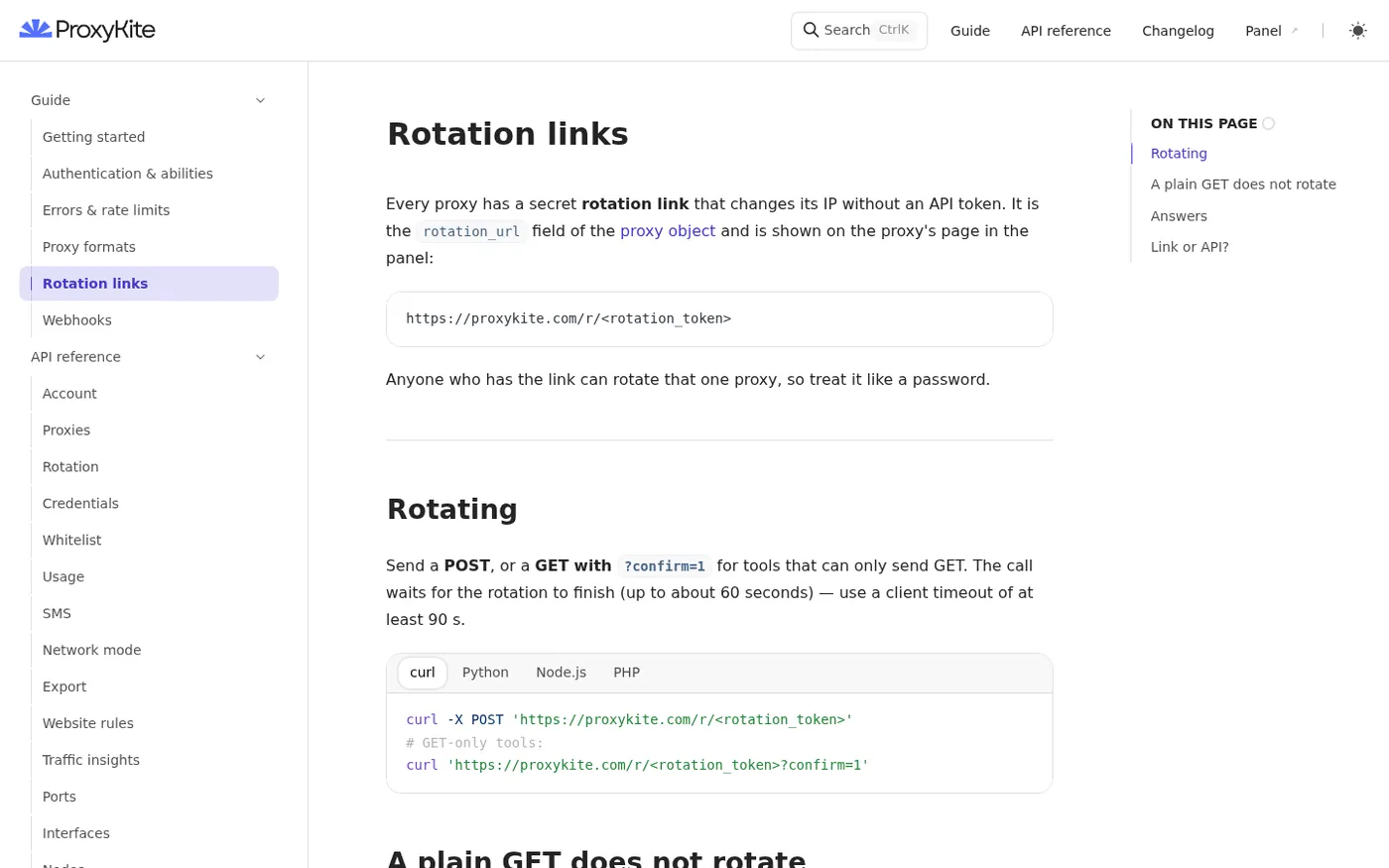
Pause new work before rotating. After the dongle reconnects, wait for the proxy to report ready, then send a fresh test request. Existing TCP connections can belong to the old route, so do not rotate in the middle of a long upload, login sequence, or checkout test.
Which mode fits common proxy work?
Choose by the unit of work rather than by the overall project. One project can need both modes: a scraper may rotate between independent product pages, then use a sticky route for a multi-request login flow used by an authorized QA test.
| Use case | Route choice | Practical pattern |
|---|---|---|
| Price monitoring | Rotating for independent snapshots | Finish a batch, rotate, then start the next batch |
| Ad verification | Sticky per verification flow | Keep the page load and asset checks together |
| Search-result or rank checks | Rotating between independent checks | Use a timer or on-demand trigger between batches |
| Account management for your own or client accounts | Sticky | Keep the account’s browser state and proxy together |
| Marketplace listing QA | Sticky for a multi-step test | Rotate only between complete test runs |
| Public-page collection | Rotating | Use a new route only when the job benefits from it |
| Long-lived IP allowlisting | Do not rely on a short sticky timer | Confirm whether the destination needs a stable address for days |
Rotation is not a workaround for abusive traffic, platform bans, rate-limit evasion, or access you do not have permission to test. Use the mode that makes your authorised workflow predictable and respect the destination’s terms.
How to choose a timer from 60 seconds to 7 days
ProxyKite’s timer range is broad because workloads have different units. The shortest setting, 60 seconds, can suit a controlled periodic check that finishes well before the next rotation. The longest setting, 7 days, can suit a route that should remain unchanged for a long operating window, subject to the mobile connection itself.
Start with the length of one complete logical job, then add room for the normal reconnect and verification step. For example, if a QA flow takes 12 minutes from login to result, a 60-second timer is a poor match because it can interrupt the flow. A 30-minute timer gives the flow a larger window, while rotating between completed tests keeps the boundary explicit.
| Timer example | A sensible starting use | What to watch |
|---|---|---|
| 60 seconds | Short, independent checks | Whether a rotation overlaps a request |
| 5 minutes | Small batches that finish quickly | Readiness time after reconnect |
| 30 minutes | Multi-request checks with a known duration | Whether the full flow fits comfortably |
| 6 hours | A work shift or long monitoring window | Carrier-driven changes during the window |
| 24 hours | Daily collection or daily QA cycle | Data-plan usage and job boundaries |
| 7 days | A long sticky period with no planned rotation | Whether the workflow really needs a mobile route held that long |
The timer is a trigger, not an IP-change promise. If the carrier assigns the same public address after a reconnect, the timer still did its job. Measure three things instead: whether the dongle became ready, whether the test request used the intended proxy, and whether the observed IP changed.
A simple test for sticky and rotating behaviour
Test the proxy from the same kind of client that will run the real workflow. A basic HTTP check looks like this:
curl -x "http://USER:PASS@HOST:PORT" https://api.ipify.orgFor SOCKS5, use the format exported by the panel or ProxyKite’s proxy-format guide. Record the time and returned IP. Then apply the chosen rotation trigger, wait for the proxy to become ready, and run the command again with a new request.
For a sticky test:
- Start the session and record the public IP.
- Send several requests using the same proxy and client state.
- Confirm that the route did not intentionally rotate during the test.
- Treat a carrier reconnect as a separate event and record it.
For a rotating test:
- Finish a complete batch and stop new work.
- Trigger on-demand rotation, call the private rotation link, or let the timer fire.
- Wait for readiness rather than retrying immediately in a tight loop.
- Run a fresh IP check and start the next batch only after the proxy is ready.
If you are still building the hardware path, the guide to building your own mobile proxy with 4G and Raspberry Pi explains the dongle, Linux box, cloud routing, and first proxy test. For a multi-dongle layout, see the 4G proxy farm setup guide and keep each rotation target tied to the correct physical dongle.
Common mistakes
Treating sticky as static forever
A sticky setting prevents intentional rotation for the chosen session. It cannot control every carrier reconnect or guarantee that a mobile public IP is permanent. Verify the address at important boundaries and design the workflow to restart cleanly if the mobile session changes.
Rotating halfway through a stateful flow
Changing the route between login, form load, and submission can make a valid workflow look inconsistent. Keep the entire flow on one sticky route, then rotate after the result has been saved.
Assuming every rotation must return a new IP
The carrier decides the new allocation. A repeated IP may mean the previous session was not fully released or that the carrier selected the same address again. Check that the request used a fresh connection through the correct dongle before changing scripts.
Choosing the shortest timer by default
The shortest interval is not automatically the most useful one. A timer that interrupts work creates more retries and harder-to-read logs. Set the interval around the complete job, then measure readiness and success over several cycles.
Reusing cookies after changing routes
An IP address is only one part of a client’s state. Keep cookies, authentication, headers, and browser profile aligned with the sticky route they belong to. When deliberately starting fresh, discard the old application state with the old route.
FAQ
What is the difference between sticky and rotating proxies?
A sticky proxy keeps traffic on one selected route for a session or chosen period. A rotating proxy requests or schedules a new route between requests, batches, or jobs. On one 4G dongle, sticky means no intentional rotation while the session runs; rotating means the dongle rebuilds its mobile data session.
Are sticky proxies better for logins?
Usually, a sticky route is the better starting point for a legitimate login and the pages that follow it. The account’s cookies and server-side state can stay associated with one source route. Keep the browser state and proxy session together, and follow the destination’s rules.
Are rotating proxies better for scraping?
Rotation can fit independent public-page requests or batches because each unit can start with a fresh mobile session. It is not automatically better for every scraper: pagination, authenticated sessions, and multi-step forms may need stickiness. Decide based on whether the target links the requests together.
Does a sticky proxy keep the same IP forever?
No. It prevents intentional rotation during the selected session, but a carrier reconnect, modem reset, or network event can change the public address. Treat sticky as route continuity for a workflow, not as a permanent static-IP guarantee.
How often should a 4G proxy rotate?
Use the least frequent interval that meets the job’s requirements. ProxyKite supports on-demand, rotation-link, and timer triggers from 60 seconds to 7 days. Measure how long your jobs take, how long readiness takes after a reconnect, and whether the carrier returns a different address before shortening the timer.