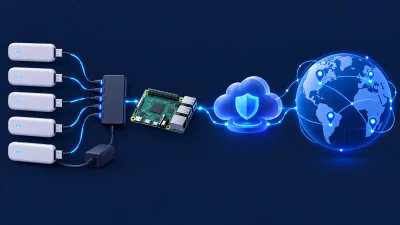
An smm proxy gives a social media agency a repeatable network path for each authorised client workflow. The practical setup is simple: assign one of your own 4G/LTE dongles to each client, keep active sessions sticky, and give staff controlled access instead of sharing one password.
What you need before you start
This guide is for legitimate work on accounts that your agency or client owns, or that your client has explicitly authorised you to manage. A proxy helps you organise network access; it does not make spam, fake engagement, account creation at scale or ban evasion acceptable.
Prepare these items:
- A Huawei E3372 HiLink dongle for each separate client workflow, or a similar compatible Huawei HiLink model.
- An active SIM and data plan for every dongle. The SIMs, data and hardware are yours; ProxyKite supplies software and cloud routing only.
- A Raspberry Pi or Linux box, plus a powered USB hub when you have more dongles than the computer can power reliably.
- Outbound internet access from the box. You do not need a static public IP or inbound port forwarding, and the setup can work behind CGNAT.
- A written client inventory: account owner, platform, operator, assigned dongle, region, browser or app profile, and escalation contact.
- The platform’s approved team permissions or API access for the work you will perform.
If you are building the hardware side first, see our 4G proxy farm setup guide and the Raspberry Pi mobile proxy guide. They cover the box, hubs, power and dongle layout in more detail.
Why agencies use mobile IPs
An agency often moves between many client workspaces from one office, VPN or cloud machine. That makes a clear account-to-network map useful for operations: staff know which connection belongs to which client, handoffs are easier to audit, and a client workflow is not accidentally mixed with another one.
Mobile proxying is especially useful when the agency already owns the dongles and SIMs. You control the hardware and the carrier relationship, while the routing layer exposes each dongle as an HTTP and SOCKS5 endpoint. Traffic uses the data plan in the assigned SIM rather than a separate proxy bandwidth bill.
The goal is consistency, not disguise. Keep the client’s actual business location and account permissions in your records, use the platform’s own tools where they fit, and do not promise a particular outcome from an IP address.
Step 1: Map one client workflow to one dongle
Why: A stable inventory prevents accidental cross-use when several operators work from the same agency box.
- Give each dongle a short internal ID, such as
client-acme-01. Do not put a client password, access token or full phone number in the ID. - Record the client, platform, account or workspace, assigned operator, approved country or region, SIM reference and dongle ID in your agency’s password manager or restricted operations sheet.
- Assign the dongle to one client workflow. If a client has separate production and testing accounts, record them as separate entries even if they share an authorised team workspace.
- Decide which browser profile or approved management tool will always use that endpoint. Keep the profile, client record and proxy assignment together when work moves between staff.
- Add a change note whenever you replace a SIM, move a dongle or change an endpoint. Include who approved it and when.
What success looks like: You can answer “which connection is this account using?” in seconds, and a new operator can take over without guessing.
Step 2: Connect the dongles and install the routing layer
Why: The box should turn each customer-owned HiLink dongle into a reachable proxy endpoint without requiring inbound access to your office or server.
- Put the Raspberry Pi or Linux box on a stable outbound internet connection.
- Connect one Huawei E3372 HiLink dongle directly first. Confirm that it is in HiLink mode and that the operating system can see it before adding a hub or more sticks.
- Follow the current ProxyKite getting-started guide to install the software. Use the installer and configuration values shown there rather than copying an old command from a different deployment.
- Add a powered USB hub for the remaining dongles. Keep the hub and box ventilated, and label each USB port so a physical move does not silently change your inventory.
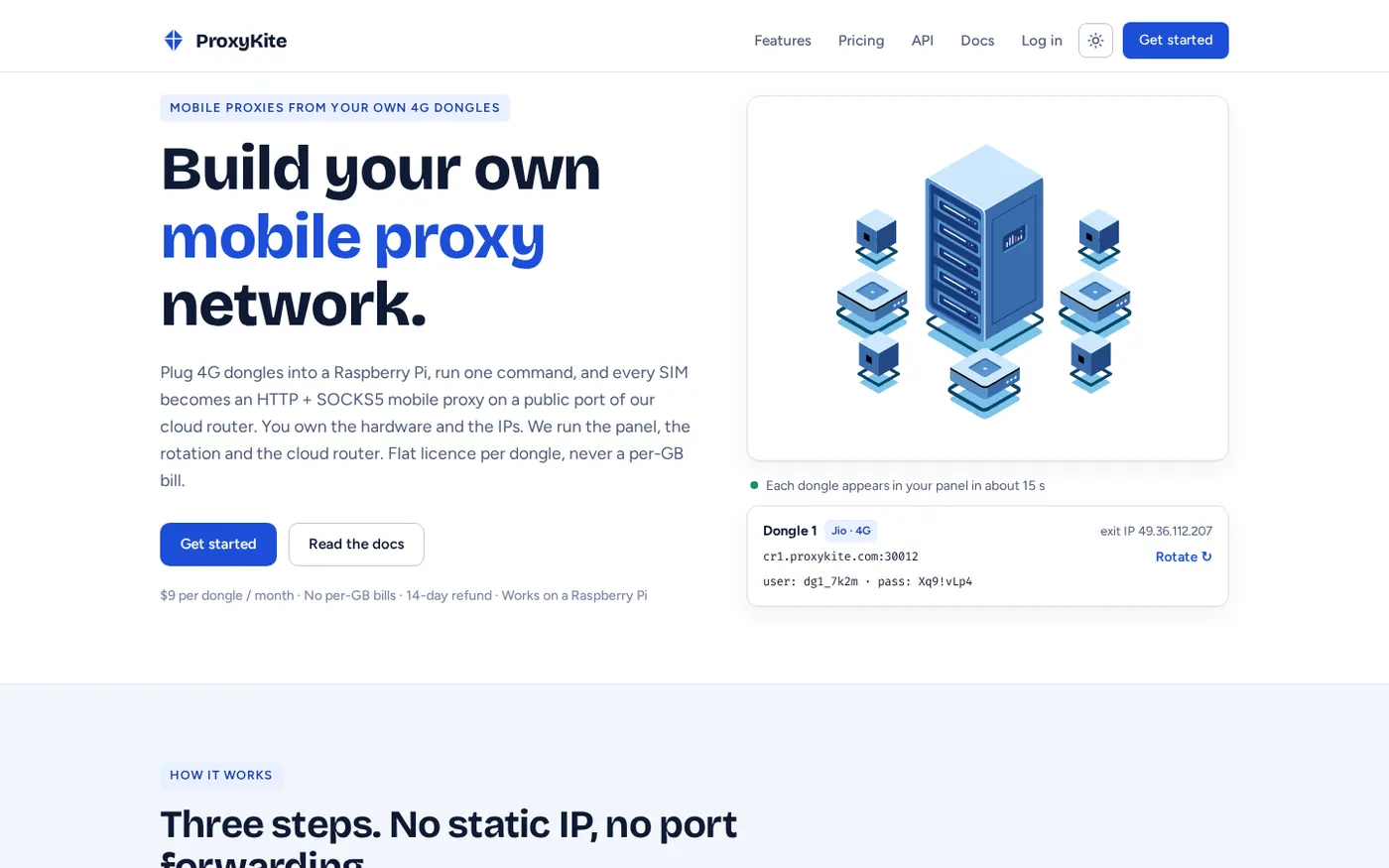
- In the ProxyKite panel, check that the expected dongles appear and that each one has a generated endpoint. The service routes the endpoint through the cloud, so you do not need to open a port on the local network.
What success looks like: Every intended dongle is online in the panel, each endpoint has the correct internal assignment, and the box has only the outbound connections it needs.
Step 3: Give each client a dedicated endpoint
Why: A one-client-to-one-dongle map makes session behaviour and staff permissions easier to reason about.
Use the endpoint format that matches the client’s tool. ProxyKite supports HTTP and SOCKS5, with shared or split ports, and the proxy formats guide shows the exact values to paste.
| Agency record | Connection to assign | Good default |
|---|---|---|
| Client A, Instagram and Facebook workspace | Dongle A endpoint | One browser or app profile, one stable endpoint |
| Client B, TikTok workspace | Dongle B endpoint | Separate profile and separate credentials |
| Client C, X publishing workflow | Dongle C endpoint | Platform-approved API or tool, with a human review step |
Do not rotate the endpoint simply because a different staff member takes over. A handoff should preserve the client assignment and the approved profile. If a dongle must be replaced, record the change and have the operator complete the verification checks again.
What success looks like: The same authorised client workflow reaches the same assigned endpoint, and no operator needs to guess which port belongs to which account.
Step 4: Keep active sessions sticky
Why: A login, content review and publish flow is easier to operate when the public IP does not change halfway through the session.
Choose sticky behaviour for normal browser work and scheduled publishing where the tool supports it. ProxyKite can also rotate on demand, through a rotation link, or on a timer from 60 seconds to 7 days; use those controls for a defined operational reason, not as a way to evade platform enforcement.
For each client, document:
- Whether the workflow uses a sticky session.
- Which staff action is allowed to request a rotation.
- Whether a rotation requires the operator to sign in again or re-run a check.
- Where the rotation link or API credential is stored.
- Who receives the alert if the endpoint changes unexpectedly.
The rotation-links guide explains the link-based flow. For an agency, treat a rotation link like a credential: keep it out of chat messages, tickets and shared screenshots.
What success looks like: An operator can start and finish an authorised task without an unplanned mid-session change, and any intentional rotation has an owner and an audit note.
Step 5: Give staff access with sub-users
Why: Staff need to perform assigned work, but they should not all receive the owner’s account, every client’s proxy credential or unrestricted rotation access.
Create a sub-user for each operator or team role in the panel. Then apply the smallest useful scope:
- Give the operator access only to the client endpoints they manage.
- Use a username and password or an IP whitelist according to the tool and office setup. Follow the authentication guide for the supported format.
- Keep client-facing exports separate from internal admin access. ProxyKite can export
host:port:user:pass,user:pass@host:portand CSV formats, so choose one format and protect the resulting file. - Set bandwidth limits per day, week or month where a client agreement or internal budget requires them.
- Remove access when a contract or staff assignment ends. Review the list after every client handoff.
ProxyKite also includes sub-users, white-label options, live traffic insights, website allow/block rules, webhooks and Telegram alerts. Use the controls that support your service process; do not expose the proxy panel as a substitute for the client’s own platform permissions.
What success looks like: Each operator can complete the assigned task, cannot browse unrelated client endpoints, and can be removed without changing the owner’s credentials.
Step 6: Test the workflow before handing it over
Why: A proxy that appears online in a dashboard still needs to be checked from the same kind of tool and network path that the operator will use.
Run a direct connectivity check from the box first:
curl -fsS https://api.ipify.orgThen test the assigned endpoint with placeholder values. Replace HOST, PORT, USER and PASSWORD with the values from the export; never put a real credential in a public ticket or shell history that other staff can read.
curl -fsS \
  --proxy "http://USER:PASSWORD@HOST:PORT" \
  https://api.ipify.org
The second response should show the public address reached through the assigned dongle, rather than the direct address from the first command. Also test the protocol your tool will use:
curl -fsS \
  --proxy "socks5h://USER:PASSWORD@HOST:PORT" \
  https://api.ipify.org
Do not use a real client account for the first test. Check the endpoint, then sign in through the approved platform flow with the client’s consent and follow any verification prompts normally.
What success looks like: HTTP and SOCKS5 tests return a public address through the intended endpoint, the operator can reach the assigned platform, and the client record contains the test date and endpoint ID.
Verify the setup as an agency
Before production work, run this short handoff checklist:
- The client has authorised the agency, the assigned operator and the tool or API being used.
- The account, browser profile, dongle and endpoint are recorded as one mapping.
- Sticky behaviour is enabled for active sessions where appropriate.
- The operator has a sub-user, not the owner’s panel password.
- Rotation links, API keys and exported credentials are stored privately.
- A direct
curlresult and a proxiedcurlresult were recorded without publishing either credential. - Daily, weekly or monthly traffic limits match the client agreement.
- The operator knows how to report an unexpected IP change or authentication prompt.
For a larger fleet, repeat the check per client rather than assuming that one healthy dongle proves every USB port, SIM or endpoint is configured correctly.
Platform rules to respect
Proxy routing does not replace a platform’s rules. Use official team access, business workspaces and APIs when they are available, keep a human accountable for client content, and obtain consent for actions performed through a client account.
X says users are responsible for actions taken by their account or authorised applications. Its current automation rules require express consent for automated actions through another user’s account, prohibit non-API website scripting and prohibit spammy or unsolicited automated activity.
TikTok’s Content Sharing Guidelines require users to retain awareness and control of what is posted through an API client. They also specify consent and disclosure requirements for content-sharing flows. Treat those requirements as part of the workflow design, not as a final checkbox after the post has already been sent.
Across platforms, avoid mass account creation, fake engagement, unsolicited direct messages, credential sharing, scraping behind a login without permission and attempts to work around an account restriction. If a client asks for a workflow that conflicts with a platform’s current rules, stop and redesign the workflow with the client.
Troubleshooting an SMM proxy workflow
| Symptom | Check first | Safe next action |
|---|---|---|
| The endpoint is online but the tool cannot connect | HTTP versus SOCKS5 type, host, port and authentication format | Re-export the endpoint and repeat the curl test with the matching protocol |
| The public address is not the expected one | Dongle-to-client mapping and the SIM currently connected | Pause the client workflow, inspect the panel and correct the inventory before continuing |
| A login asks for verification after a handoff | Whether the operator used the assigned profile and endpoint | Complete the platform’s normal verification process; do not force repeated logins or rotate randomly |
| Several dongles disappear together | Powered hub capacity, cable seating, heat and box logs | Test one stick directly, then add the hub back after the box and power path are stable |
| Traffic reaches a limit unexpectedly | The sub-user quota, client workload and SIM data plan | Review the quota and client approval before increasing it; remember that SIM data is customer-owned |
| A rotation was requested by the wrong person | Rotation-link permissions and sub-user scope | Revoke or replace the exposed link and record the access change |
If the problem affects only one dongle, isolate that dongle and preserve the rest of the agency’s mappings. If it affects several endpoints, check power, network access and the panel configuration before changing client accounts.
When to scale the fleet
Start with one client and one dongle. Once the mapping, handoff and verification process is repeatable, add the next client in a separate inventory row and test it independently.
For 50 or more dongles, ProxyKite offers volume pricing on request and supports reseller-oriented sub-users, quotas and white-label operation. Keep the same controls at scale: one accountable owner per client, separate operator access, documented rotation, and a clear record of which physical dongle feeds which endpoint.
The flat licence model is easy to forecast because the licence is $9 per active dongle per month and traffic uses your own SIM data plan. That makes the relevant planning question the number of active dongles and their SIM costs, not a separate per-gigabyte proxy invoice.
FAQ
What is an SMM proxy?
An SMM proxy is a proxy connection used to route legitimate social media management work through a chosen network address. In this setup, the address comes from a customer-owned 4G/LTE dongle and SIM, while software exposes it as an HTTP or SOCKS5 endpoint.
Should every social media client have a separate proxy?
For a clear agency workflow, assign one dongle and endpoint to each client workflow that needs separation. This keeps the account, browser profile, operator access and network record together; it is an operations practice, not a promise that a platform will approve every action.
Are sticky sessions better than rotating proxies for social media management?
Sticky sessions are usually the simpler choice for a login-to-publish workflow because the endpoint stays consistent during the task. Use rotation only when you have a documented operational reason and know how the platform and management tool handle the change.
Can staff share one SMM proxy login?
They can technically share credentials, but an agency should use sub-users or separate controlled credentials instead. Scoped access makes handoffs, quota limits and access removal easier to manage.
Does ProxyKite provide SIM cards or mobile data?
No. ProxyKite provides software and cloud routing; you supply the Huawei HiLink dongles, SIM cards and data plans. The licence is charged per active dongle, with no separate per-gigabyte ProxyKite traffic charge.