
A proxy reseller API lets your shop provision access, return connection details, rotate IPs, and update customers without opening a dashboard for every order. With ProxyKite, the practical workflow is to create and assign sub-users in the panel, then automate the proxy, port, credential, rotation, and webhook work around those assignments.
This guide uses the REST API at https://proxykite.com/api/v1. It is designed for a backend that you control. Do not put an API token or a token-less rotation URL in browser JavaScript, a public repository, or a customer-visible log.
What to automate first
Automate the events that happen repeatedly after a customer buys access:
- Confirm which proxy and user belong to the order.
- Return the correct HTTP and SOCKS5 connection details.
- Change a port when your product needs separate HTTP and SOCKS5 endpoints.
- Rotate an assigned proxy when the customer or your job requests it.
- Mark a rotation, address change, quota event, or node status change in your shop.
Keep billing, abuse checks, and customer entitlements in your own application. The API manages ProxyKite resources; it is not a replacement for your order database. A useful record has your order ID, ProxyKite proxy ID, assigned username, port, status, paid-until date, and the last API event ID.
If the hardware side is not ready, start with 4G Proxy Farm Setup: Hardware, Power and Software and How to Build Your Own Mobile Proxy with 4G and Raspberry Pi. The API assumes that your Huawei E3372 HiLink dongles and Raspberry Pi/Linux box are already connected to your ProxyKite account.
What you need
Prepare these items before writing the integration:
- A ProxyKite account with at least one active proxy.
- A backend service that can make HTTPS requests and verify JSON.
- A private database for orders, proxy IDs, usernames, ports, and event IDs.
- One API token for inventory reads and a separate token with the smallest ability needed for rotation or management.
- A public HTTPS webhook endpoint that answers quickly.
ProxyKite charges US$9 per active dongle per month on the standard per-dongle licence, with no per-GB charge; fleets of 50 or more dongles can contact ProxyKite for volume pricing. You bring the dongles, SIM cards, and data plans. Your resale price and customer billing remain your responsibility.
Step 1: API keys and authentication
Why: every request is scoped to a login and token level, so choosing the right token prevents accidental access to secrets or management actions.
In the ProxyKite panel, open API tokens and create a token for the job. The available levels are cumulative:
| Token level | Use it for |
|---|---|
read | Listing proxies, reading usage, rotation history, SMS, whitelists, and non-secret inventory |
rotate | Everything in read, plus on-demand rotation and the secret connection fields needed to operate assigned proxies |
manage | Rotation plus password, whitelist, auto-rotation, labels, limits, rules, ports, and other changes |
Store the token as a server-side secret. For example, use an environment variable in your service:
export PROXYKITE_BASE='https://proxykite.com/api/v1'
export PROXYKITE_TOKEN='paste-the-token-in-your-secret-store'

curl --fail-with-body --silent --show-error \
  -H "Authorization: Bearer $PROXYKITE_TOKEN" \
  -H 'Accept: application/json' \
  "$PROXYKITE_BASE/me"
The Authorization: Bearer pattern is defined in RFC 6750. Never print the full token in an exception, and redact password, http, socks5, and rotation_url fields before sending API responses to application logs.
Success looks like: /me returns your login identity and its abilities. A 401 means the token is missing, wrong, revoked, or expired. A 403 means the login or token is not allowed to perform that action.
Step 2: Create sub-users and map orders
Why: a reseller needs an entitlement boundary before returning a proxy to a customer.
Create the customer login and assign its proxy in the ProxyKite panel under the team or sub-user controls. Set the customer’s quota and expiry in the panel, then save the relationship in your own database. The public REST reference does not expose a POST /sub-users endpoint; do not guess one or call internal panel routes from your shop.
Use a mapping like this in your application:
| Your record | ProxyKite value |
|---|---|
customer_id | Sub-user login ID or email in your system |
proxy_id | Numeric proxy ID |
username | The proxy user returned by the proxy object |
access_expires_at | Your paid-through or assigned expiry time |
status | Your order state, separate from proxy online state |
A reseller sub-user only sees the proxies assigned to it. A request for a proxy outside that scope behaves as unavailable, so your backend should use the assignment record as the first check and the API response as the second. Do not use a shared owner token in customer-facing code.
Success looks like: your database can answer “which proxy user belongs to this paid order?” without searching a full export, and the sub-user sees only its assigned access in the panel or API.
Step 3: List proxies and export credentials
Why: inventory should be pulled from the API instead of copied from a dashboard, while credentials should be delivered only to the order that owns them.
Start with a read-only inventory request:
curl --fail-with-body --silent --show-error \
  -H "Authorization: Bearer $PROXYKITE_TOKEN" \
  -H 'Accept: application/json' \
  "$PROXYKITE_BASE/proxies" \
  | jq '.data[] | {id, label, host, port, status, enabled, current_ip, ports}'
The response is wrapped in data. Use the numeric id as your stable reference. The host and port are the current connection address; store them as a cache and refresh them after a port change or an address-change webhook. A proxy can expose HTTP and SOCKS5 on a shared port, or use split ports.
For a backend export job, the API can return a plain-text or CSV export:
curl --fail-with-body --silent --show-error \
  -H "Authorization: Bearer $PROXYKITE_TOKEN" \
  "$PROXYKITE_BASE/export?format=csv" \
  -o /secure/private/proxy-export.csv
read tokens receive masked secrets. A token with rotate or manage, held by a login allowed to rotate, can receive the full credential fields and rotation URL. Prefer fetching one proxy object, selecting the assigned username, and returning only that customer’s http and socks5 values. If you use the all-proxy CSV, keep it in a private backend location and delete temporary copies after processing.
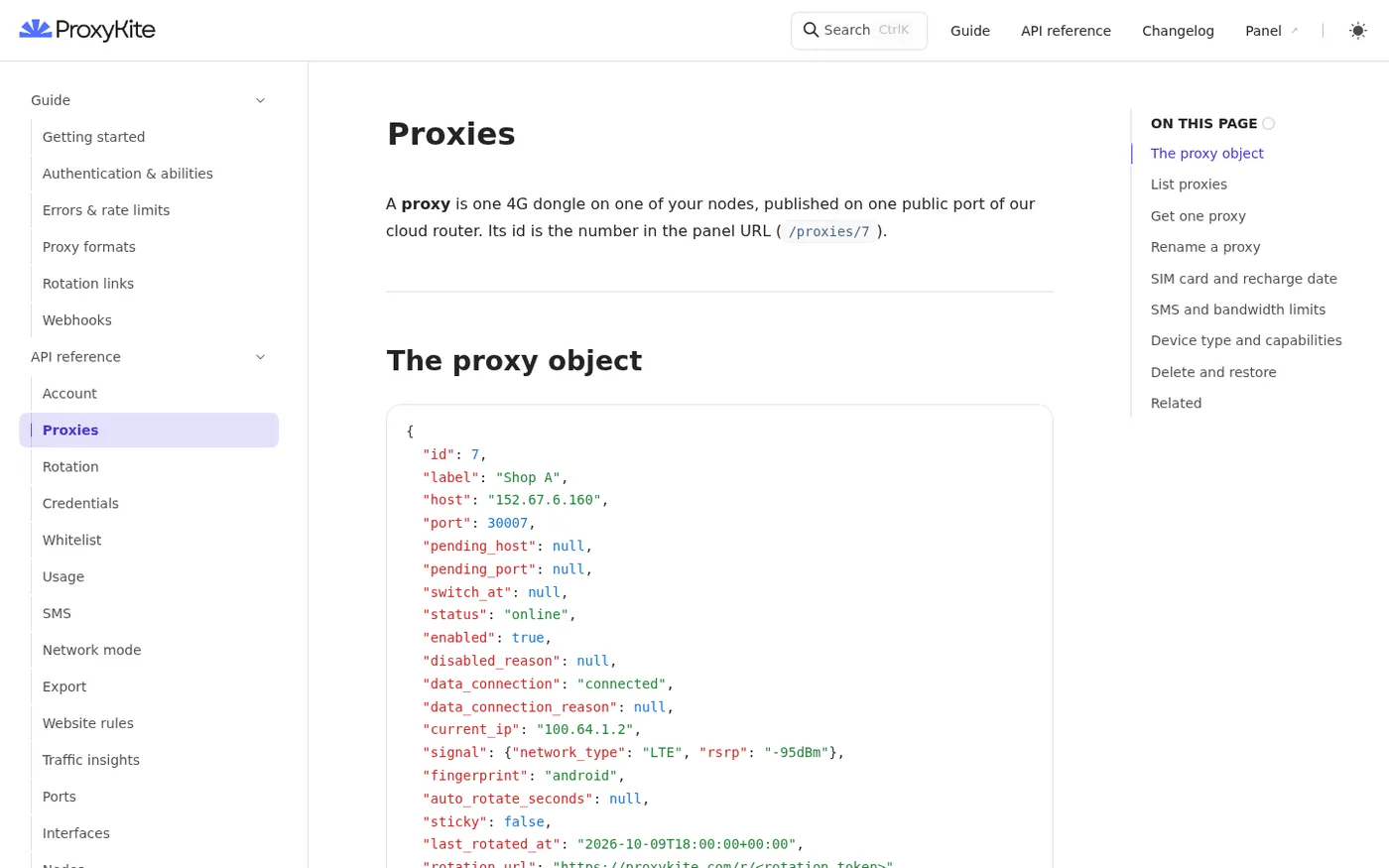
For a normal customer hand-off, save the two connection strings in your encrypted order record, show them once in your authenticated customer area, and tell the customer which protocol each string uses. Do not email a complete fleet export when one assigned credential is enough.
Success looks like: a paid order receives only its assigned proxy credentials, and your application can refresh host, port, and status from /proxies without scraping the panel.
Step 4: Change ports from your shop
Why: port allocation belongs in your provisioning workflow when you sell separate HTTP and SOCKS5 endpoints or need to reconcile a changed address.
Read the current port mode before changing it:
curl --fail-with-body --silent --show-error \
  -H "Authorization: Bearer $PROXYKITE_TOKEN" \
  "$PROXYKITE_BASE/proxies/7/ports"
To split HTTP and SOCKS5, use a management token from the owner or a team admin:
curl --fail-with-body --silent --show-error -X PUT \
  -H "Authorization: Bearer $PROXYKITE_TOKEN" \
  -H 'Content-Type: application/json' \
  -d '{"mode":"split","socks5_port":30008}' \
  "$PROXYKITE_BASE/proxies/7/ports"
You can omit socks5_port and let the cloud router choose a free port. Port changes can change the address your customer uses, so treat the response as authoritative and update your order record in the same workflow. Check that your selected port is inside the proxy’s reported range and is not already assigned.
Do not let a sub-user change ports from the storefront. Port management is an owner-level action. Your shop can expose a “request a new port” button that queues a backend job, checks the customer’s entitlement, performs the change, and then refreshes the connection details.
Success looks like: the API response shows the intended mode, http_port, socks5_port, and host, and your customer area displays the new values rather than stale cached credentials.
Step 5: Rotate IPs from your own app
Why: rotation should be an explicit, auditable action tied to an order, not a blind retry loop that can collide with an existing rotation.
For an on-demand rotation, call the proxy-specific endpoint:
curl --fail-with-body --silent --show-error -X POST \
  -H "Authorization: Bearer $PROXYKITE_TOKEN" \
  -H 'Accept: application/json' \
  "$PROXYKITE_BASE/proxies/7/rotate"
The successful response is not wrapped in data; it includes ok, old_ip, new_ip, method, and duration_ms. Update your audit record with the old and new values, but do not promise a fixed rotation duration to your customer. A rotation can return 409 rotation_in_progress, which means another rotation is already running. Read the rotation history instead of immediately starting another request.
For a timer, use seconds from 60 through 604800, which is 60 seconds through seven days:
curl --fail-with-body --silent --show-error -X PUT \
  -H "Authorization: Bearer $PROXYKITE_TOKEN" \
  -H 'Content-Type: application/json' \
  -d '{"interval_seconds":600,"sticky":true}' \
  "$PROXYKITE_BASE/proxies/7/auto-rotate"
Send null or 0 to turn the timer off. Use the sticky option when a customer needs continuity between rotations, and document the behavior in your own product UI.
If you need a customer button without an API token, use the rotation URL returned to an authorised rotate or manage login. A backend can call it with POST:
curl --fail-with-body --silent --show-error -X POST \
  'https://proxykite.com/r/rotation_token_from_the_private_response'
Do not make a plain GET request to that URL. A plain GET does not rotate; it requires confirm=1 for tools that can only send GET. Treat the URL like a password because it can rotate the proxy without another header.
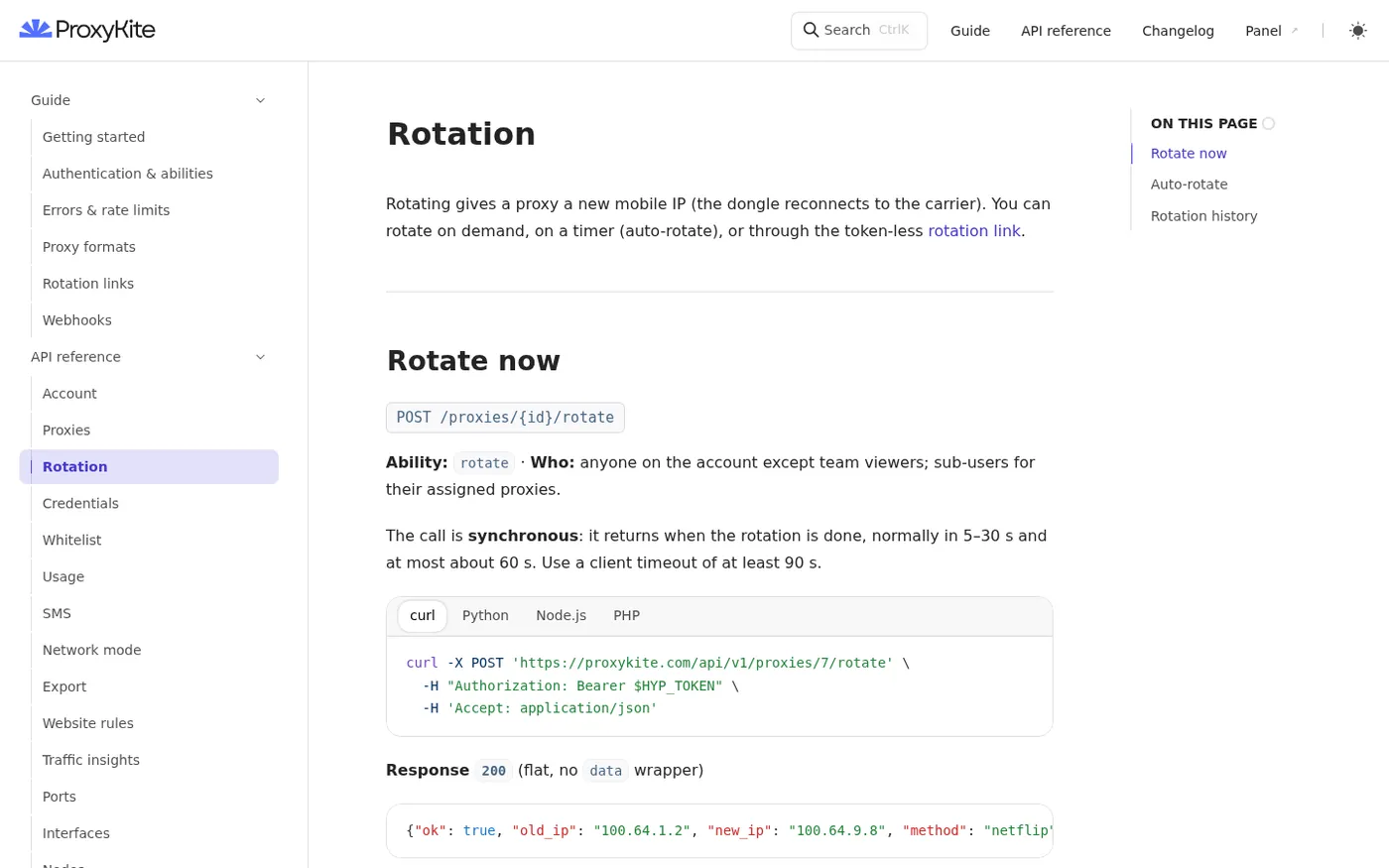
Success looks like: your order log records one rotation request, the response contains the new IP, and a second concurrent click is handled as an in-progress operation rather than creating duplicate work.
Step 6: Webhooks for IP changes and status
Why: polling every proxy wastes requests and delays customer updates; a signed event lets your backend update its cache when something changes.
Add your HTTPS endpoint under Webhooks in the ProxyKite panel. Useful events for a reseller include:
| Event | What to update |
|---|---|
rotation.completed | The rotation result, old/new IP, method, and audit timestamp |
proxy.address_changing | Mark the proxy address as changing and pause credential refreshes |
proxy.address_changed | Replace the cached host and port for every affected order |
quota.exceeded | Pause delivery or show an action needed message |
node.offline / node.online | Update fleet status and notify an operator when appropriate |
The webhook payload includes an event ID, event name, timestamp, and a data object. Verify the HMAC signature over the exact raw request body before accepting it. The API sends X-Hyp-Timestamp, X-Hyp-Signature, and X-Hyp-Delivery headers. In PHP, the verification shape is:
$timestamp = $_SERVER['HTTP_X_HYP_TIMESTAMP'] ?? '';
$signature = $_SERVER['HTTP_X_HYP_SIGNATURE'] ?? '';
$body = file_get_contents('php://input');

$expected = 'sha256=' . hash_hmac(
    'sha256',
    $timestamp . '.' . $body,
    $_ENV['PROXYKITE_WEBHOOK_SECRET']
);

$valid = hash_equals($expected, $signature)
    && abs(time() - (int) $timestamp) < 300;
Use PHP’s hash_hmac documentation when adapting this to your framework. Reject an invalid signature, an old timestamp, or a duplicate event ID. Return a success response quickly, then process the order update in a queue. ProxyKite makes one delivery attempt with a short timeout, so a slow webhook handler should not be your only source of truth.
There is a difference between a dongle and its box: node.offline reports the box status at the webhook layer, while the panel’s alerts can cover dongle-specific status. Keep those states separate in your shop instead of telling customers that every node event means every assigned proxy is unusable.
Success looks like: a signed rotation.completed event updates the matching order exactly once, and an address-change event causes your backend to fetch fresh connection details before displaying them.
Step 7: Hook the API into billing or your shop
Why: separating payment state from infrastructure state prevents a paid order from being delivered before an assignment is ready.
Use this sequence in your order handler:
- Receive a successful payment notification from your billing system.
- Confirm that the product, customer, quota, and paid-through date are valid.
- Find an available assigned proxy and user in your database.
- Fetch the proxy from
GET /proxies/{id}with a backend token that can read the required secret fields. - Return only the selected customer’s HTTP and SOCKS5 details.
- Store the proxy ID, username, current host, port, and delivery timestamp.
- Subscribe the order to
rotation.completed,proxy.address_changed, and relevant quota events.
When a customer renews, update your billing record first and keep the ProxyKite assignment consistent with the paid-through date. When access expires, stop returning credentials from your shop and remove or reassign the proxy in the panel according to your operating policy. Do not assume that a customer payment automatically creates a ProxyKite sub-user: provisioning and assignment remain an explicit step.
For a small fleet, the standard licence is a flat per-dongle cost. For a reseller operating 50 or more dongles, ask about the reseller fleet plan and describe your expected number of active dongles, customer model, and whether you need white-label controls.
Success looks like: payment, assignment, delivery, rotation, and expiry each have a recorded state, so a support operator can explain what happened without asking for a customer’s API token.
Rate limits and error handling
Why: API automation becomes dependable when it handles structured errors instead of retrying every failed request in the same way.
The limit is 120 requests per minute per login across that login’s tokens. Cache inventory, use webhooks for changes, and do not poll every proxy on every page load. When the API returns 429, respect Retry-After and retry with bounded exponential backoff.
Branch on the machine-readable error field, not the human-readable message:
| Response | Action |
|---|---|
401 | Stop and rotate the secret or create a valid token; do not retry unchanged credentials. |
403 | Check token level, login role, and sub-user assignment. |
404 | Treat the proxy as outside the login scope or no longer available. |
409 rotation_in_progress | Read rotation history and wait for the current operation. |
422 validation_failed | Show the field errors to an operator; fix the request before retrying. |
429 rate_limited | Honor Retry-After, then retry with backoff. |
502 or 503 | Record the operation as pending or failed, then retry only when your policy allows it. |
For rotation and webhook processing, use an idempotency key in your own database even where the API endpoint does not accept one. Before issuing a new rotation, check whether the same order already has a recent request. For webhook events, store X-Hyp-Delivery or the payload ID and acknowledge a duplicate without applying the state transition twice.
FAQ
Does ProxyKite have a proxy reseller API?
Yes. ProxyKite provides a REST API at https://proxykite.com/api/v1 for authenticated proxy inventory, exports, port settings, rotation, usage, and related operations. Sub-user creation and assignment are handled in the panel, after which assigned users can be managed within their permitted scope.
Can I create sub-users with a curl request?
The public API reference does not document a sub-user creation endpoint. Create and assign the sub-user in the panel, then store that mapping in your billing system and automate proxy delivery and rotation through the REST API.
Can a reseller rotate a customer’s proxy?
An assigned sub-user can operate its assigned proxy when its login and token have the required rotate ability. An owner or team admin can also rotate it; a read-only token cannot expose the full rotation URL or perform the rotation.
How do I receive a new IP in my shop after rotation?
Subscribe to rotation.completed, verify the HMAC signature, and update the order using the event’s proxy_id, old_ip, and new_ip fields. Fetch the proxy again when you also receive an address-change event, because a cloud router move can change the host or port as well.
What does a proxy reseller API cost with ProxyKite?
The standard licence is US$9 per active dongle per month with no per-GB charge. Resellers running 50 or more dongles can request volume pricing through ProxyKite’s contact page; you still provide the hardware, SIMs, and data plans.