
What is a proxy hostname? It is the name or address your browser, script, or application uses to connect to the proxy server. In a line such as proxy.example.net:30007:u7abc:s3cret, the hostname is proxy.example.net; it is not the website you want to visit and it is not necessarily the mobile IP that the website will see.
Hostname vs IP address
A hostname is a human-readable name, usually a domain name, that points to an IP address through DNS. An IP address is the numeric address itself. A proxy client can often connect using either one, but a settings field may call both values “host” or “hostname”.
Consider this endpoint:
proxy.example.net:30007Here, proxy.example.net is the host or hostname, and 30007 is the port. The client first resolves the hostname, then opens a connection to that address on the specified port. The HTTP specification describes the host and optional port as the authority used to identify an HTTP endpoint.
The hostname identifies where your application connects. It does not identify the final website. If your browser is configured to use proxy.example.net:30007 and you open https://example.com, the browser connects to the proxy endpoint first. The proxy then handles the request to the destination.
That distinction prevents a common mistake: putting example.com in the proxy hostname field because it is the site you want to open. The destination URL and proxy endpoint are two different inputs.
Reading a proxy line: host, port, user, pass
A proxy connection usually has four values, plus an optional protocol. Take this example:
proxy.example.net:30007:u7abc:s3cretRead it from left to right:
| Part | Example | Purpose |
|---|---|---|
| Hostname | proxy.example.net | Name of the proxy server |
| Port | 30007 | Network listener used by that proxy |
| Username | u7abc | Proxy login when user-and-password authentication is enabled |
| Password | s3cret | Secret paired with the proxy username |
The hostname is only the first field. Do not paste the full line into a field labelled Hostname, Proxy host, or Server unless that application explicitly asks for a complete proxy string.
Some clients want a URL instead:
http://u7abc:s3cret@proxy.example.net:30007In this form, http:// is the proxy protocol, u7abc:s3cret is the inline login, proxy.example.net is the hostname, and 30007 is the port. The same endpoint might also be represented with a SOCKS5 scheme:
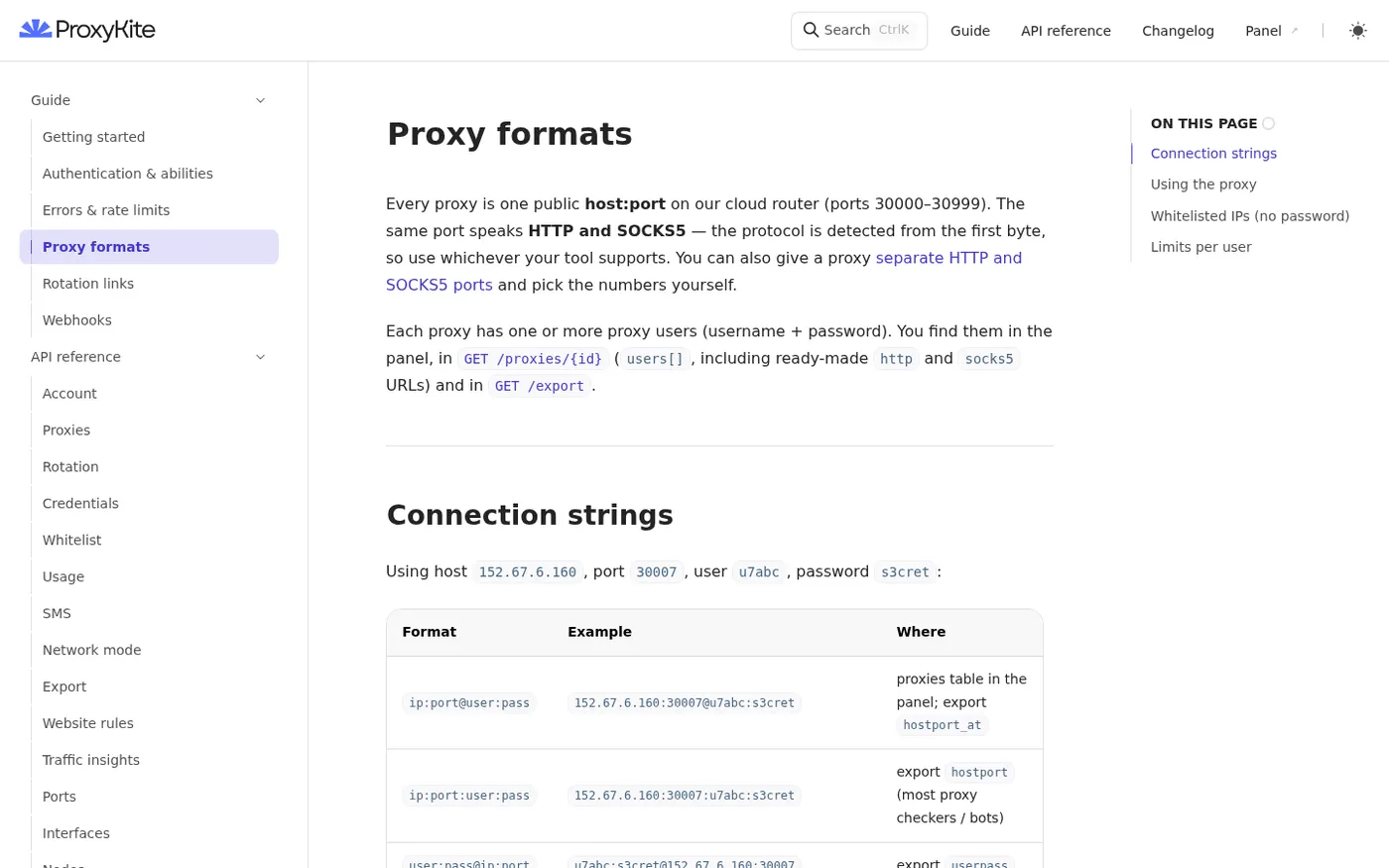
socks5://u7abc:s3cret@proxy.example.net:30007These are different ways to describe the connection. They are not interchangeable in every application. Use the exact order and protocol that the client documents. ProxyKite’s proxy formats guide shows the supported export shapes, while its authentication guide explains user-and-password and IP whitelist authentication.
Why your mobile proxy hostname is not your 4G IP
In a self-managed mobile proxy setup, the hostname is normally the public endpoint your client can reach. The 4G IP is the address used farther along the route when the request exits through the SIM-connected dongle. They serve different jobs.
The path looks like this:
browser or script
    |
    | connects to hostname + port
    v
cloud routing endpoint
    |
    | outbound connection from your box
    v
Raspberry Pi or Linux box + 4G dongle + SIM
    |
    | mobile data connection
    v
carrier network -> destination website
The hostname and port give the client a stable place to connect. The dongle’s mobile connection supplies the route to the internet. A carrier may use CGNAT, so the address visible on the dongle side may not be directly reachable from the internet. That is why a cloud routing layer can be useful: the local box makes an outbound connection, and the client connects to the public endpoint.
With ProxyKite, you provide the compatible dongle, SIM, and data plan. ProxyKite provides the software and cloud routing that exposes HTTP and SOCKS5 proxy access. No static IP or inbound port on your local connection is required, and the hostname your client uses is still separate from the mobile exit address.
This also explains why changing the hostname is not the same as rotating an IP. A rotation request changes the mobile session or route behind the endpoint. The host and port in your application may remain unchanged. To learn how the physical path fits together, see how to build your own mobile proxy with 4G and Raspberry Pi.
Where apps ask for the hostname
The field may be labelled Proxy hostname, Host, Server, or Address. Enter only the host value when the application gives you separate fields:
| Application input | Value to enter |
|---|---|
| Proxy type | HTTP or SOCKS5, as required by the endpoint |
| Hostname or server | proxy.example.net |
| Port | 30007 |
| Username | u7abc |
| Password | s3cret |
In a browser or desktop application, select the proxy protocol first if there is a protocol selector. Put the domain in the host field and the number in the port field. Put credentials in their own fields when available. Do not include http://, :30007, or u7abc:s3cret@ in the hostname field.
In a script or command-line tool, the client often accepts a full proxy URL or separate options. For an HTTP proxy, the URL form is commonly:
http://username:password@hostname:portFor SOCKS5, use the scheme required by that library, such as socks5:// or socks5h://. The h variant in clients that support it asks the proxy to resolve the destination hostname. The client’s documentation decides which form is valid.
Environment variables also use a URL-style value in many command-line tools:
export HTTPS_PROXY='http://u7abc:s3cret@proxy.example.net:30007'
export HTTP_PROXY='http://u7abc:s3cret@proxy.example.net:30007'
Treat those variables as secrets. They can be inherited by child processes or printed in diagnostic output. Use a protected configuration method for production jobs, and avoid committing proxy URLs to a repository.
Common mistakes when entering a proxy hostname
Most hostname errors come from putting a valid value in the wrong field or using the wrong format for the client.
| Mistake | What the client receives | Correct it by |
|---|---|---|
Pasting http:// into the host field | A scheme is treated as part of the hostname | Remove the scheme when fields are separate |
Pasting the whole host:port:user:pass line into Host | The client may try to resolve the entire string | Split the four values or use an import field that accepts that format |
| Entering the website hostname as the proxy hostname | The request bypasses the intended proxy or fails | Keep the proxy endpoint and destination URL separate |
| Using the 4G exit IP as the public proxy host | The address may be carrier-translated or not reachable | Use the hostname and port supplied for the proxy endpoint |
| Using the HTTP scheme for a SOCKS5-only port | The client speaks the wrong protocol | Select the matching protocol and port |
| Omitting the port | The client chooses a default that may not be your endpoint | Enter the port supplied with the proxy |
Copying a password with @ into a URL without encoding it | @ ends the credential section early | Use separate credentials or percent-encode reserved characters |
An IP address can be a valid host value, but it is not a hostname in the strict DNS sense. If a field says “hostname”, a domain such as proxy.example.net is usually the clearest entry. If the provider supplies a numeric address, enter it only where the client accepts a host or IP address.
Check the proxy with curl
The quickest test is to make one harmless request through the endpoint and observe the response. The official curl manual documents --proxy, supported proxy schemes, and the default behaviour when a scheme is omitted.
For an HTTP proxy with separate authentication arguments, replace every placeholder with the values from your own panel:
PROXY_HOST='proxy.example.net'
PROXY_PORT='30007'
PROXY_USER='u7abc'
PROXY_PASS='s3cret'

curl --fail --silent --show-error \
  --proxy "http://${PROXY_HOST}:${PROXY_PORT}" \
  --proxy-user "${PROXY_USER}:${PROXY_PASS}" \
  'https://example.com/'
printf '\n'
For a SOCKS5 endpoint, use the matching curl option and scheme:
curl --fail --silent --show-error \
  --proxy "socks5h://${PROXY_HOST}:${PROXY_PORT}" \
  --proxy-user "${PROXY_USER}:${PROXY_PASS}" \
  'https://example.com/'
printf '\n'
Success means curl completes the request and prints the destination response. A successful connection to the hostname alone is not enough: the client must use the right port, protocol, and authentication. To see the connection stages while troubleshooting, add --verbose and remove --silent:
curl --verbose \
  --proxy "http://${PROXY_HOST}:${PROXY_PORT}" \
  --proxy-user "${PROXY_USER}:${PROXY_PASS}" \
  'https://example.com/'
Read the output carefully. A DNS error points to the hostname, a connection timeout or refusal points to reachability or the port, and an HTTP 407 Proxy Authentication Required response points to proxy authentication or formatting. Do not paste verbose output containing credentials into a public issue or chat.
If you want to verify the mobile egress, request an IP-check endpoint through the proxy and compare that result with a direct request. The returned address is the public address seen by the destination, not the proxy hostname:
curl --fail --silent \
  --proxy "http://${PROXY_HOST}:${PROXY_PORT}" \
  --proxy-user "${PROXY_USER}:${PROXY_PASS}" \
  'https://api.ipify.org'
printf '\n'
Use an endpoint you are allowed to query and respect its rate limits. Keep this test separate from a larger scraper so that a format problem is not confused with an application problem.
FAQ
What should I enter as my proxy hostname?
Enter the host value supplied with your proxy endpoint, such as proxy.example.net. Do not include the protocol, port, username, or password when the application provides separate fields.
Is a proxy hostname the same as a proxy IP address?
No. A hostname is a name that can resolve to an IP address; a proxy can also be supplied as a numeric IP. Both can identify the server your client connects to, but a mobile proxy’s public endpoint is separate from the mobile exit IP seen by the destination.
Can I use a proxy hostname without a port?
Usually you should enter the port supplied with the proxy. If you omit it, a client may choose a protocol default, which may not be the listener assigned to your proxy.
Why does my proxy hostname say invalid?
Check that the field contains only a domain or accepted IP address. Remove http://, socks5://, the port, and inline credentials when those values have separate fields; then confirm that the port and protocol match.
How do I test a proxy hostname?
Use curl with --proxy, --proxy-user, the supplied port, and a harmless HTTPS URL. Test DNS and connection first, then authentication; a 407 response means the proxy was reached but did not accept the authentication exchange.
For the hardware and operating context, read the 4G proxy farm setup guide and then review the ProxyKite documentation.