
A python requests proxy lets you send HTTP and HTTPS traffic through a chosen gateway while keeping your application code almost unchanged. The details that usually cause failures are the proxies dictionary, URL-encoded credentials, SOCKS5 DNS behaviour, missing timeouts, and rotating an IP without retrying a write request.
What you need
You need Python 3, Requests, a working proxy endpoint, and permission to access the destination you are calling. The examples use https://httpbin.org/ip as a harmless endpoint that returns the observed public IP; replace it with a site or API you are authorised to access.
If you are exposing your own 4G/LTE dongle, ProxyKite’s proxy format guide shows the HTTP and SOCKS5 formats. Its getting-started guide covers the Raspberry Pi/Linux installation. A 4G setup can work behind CGNAT because the box makes outbound connections; see why 4G port forwarding fails under CGNAT for the networking background.
Keep proxy usernames, passwords, API tokens, and destination credentials out of source control. Use environment variables or a secrets manager for real runs.
Step 1: Build the proxies dictionary
Why: Requests chooses a proxy from the dictionary using the URL scheme of the destination request.
For a normal HTTP proxy, use the proxy URL for both HTTP and HTTPS destinations:
import requests

proxy_url = "http://proxy.example.com:3128"
proxies = {
    "http": proxy_url,
    "https": proxy_url,
}

response = requests.get(
    "https://httpbin.org/ip",
    proxies=proxies,
    timeout=(10, 30),
)
response.raise_for_status()
print(response.json())
The https key describes the destination scheme. It does not mean that the proxy URL must start with https://; an HTTP CONNECT proxy is commonly written as "https": "http://host:port". A proxy URL must include its scheme. Omitting it is a common cause of InvalidSchema or connection errors.
Success looks like a JSON response containing the IP observed by the test endpoint. It should be the proxy’s public egress IP, not necessarily the IP of the machine running Python.
Requests also honours HTTP_PROXY, HTTPS_PROXY, ALL_PROXY, and related environment variables. For predictable application behaviour, pass proxies=proxies on each request or centralise that argument in a small wrapper. The Requests proxy documentation explains the precedence rules.
Step 2: Add HTTP proxy authentication safely
Why: Credentials belong in the proxy URL, but reserved characters in a username or password must be percent-encoded first.
This version reads the secret values from the environment and encodes them before assembling the URL:
import os
from urllib.parse import quote

import requests

proxy_user = quote(os.environ["PROXY_USER"], safe="")
proxy_password = quote(os.environ["PROXY_PASSWORD"], safe="")
proxy_host = os.environ["PROXY_HOST"]
proxy_port = os.environ["PROXY_PORT"]

proxy_url = (
    f"http://{proxy_user}:{proxy_password}@"
    f"{proxy_host}:{proxy_port}"
)
proxies = {"http": proxy_url, "https": proxy_url}

response = requests.get(
    "https://httpbin.org/ip",
    proxies=proxies,
    timeout=(10, 30),
)
response.raise_for_status()
print(response.json())
Set the variables in your shell, without placing the password in a committed .py file:
export PROXY_USER="proxy-user"
export PROXY_PASSWORD="replace-with-your-password"
export PROXY_HOST="proxy.example.com"
export PROXY_PORT="3128"
python check_proxy.py
If the proxy returns 407 Proxy Authentication Required, check all four parts: the scheme, hostname, port, and credentials. A password containing @, :, /, or # is especially likely to break an unencoded URL.
Step 3: Use SOCKS5 with requests[socks]
Why: SOCKS support is an optional Requests extra, and socks5h makes the proxy resolve the destination hostname instead of resolving it locally.
Install the extra in the same virtual environment that runs your script:
python -m pip install "requests[socks]"Then use a SOCKS5 URL in both dictionary entries:
import os
from urllib.parse import quote

import requests

user = quote(os.environ["PROXY_USER"], safe="")
password = quote(os.environ["PROXY_PASSWORD"], safe="")
host = os.environ["PROXY_HOST"]
port = os.environ["PROXY_PORT"]

proxy_url = f"socks5h://{user}:{password}@{host}:{port}"
proxies = {
    "http": proxy_url,
    "https": proxy_url,
}

response = requests.get(
    "https://httpbin.org/ip",
    proxies=proxies,
    timeout=(10, 30),
)
response.raise_for_status()
print(response.json())
Use socks5 when you specifically want local DNS resolution. Use socks5h when the proxy should resolve the hostname. Requests documents both behaviours in its SOCKS section.
If Python reports that SOCKS support is missing, the extra was installed into a different interpreter. Compare python -m pip show requests PySocks with python -c "import requests; print(requests.__file__)" from the same shell.
Step 4: Use a Session, timeout and safe retries
Why: A Session reuses connections and cookies, while explicit timeouts prevent a slow proxy or destination from hanging the worker forever.
Requests has no default timeout. Use a tuple so connection setup and response reading have separate limits. Add retries only for operations that are safe to repeat, such as idempotent reads:
import requests
from requests.adapters import HTTPAdapter
from urllib3.util import Retry


def make_session(proxies):
    retry_policy = Retry(
        total=3,
        connect=3,
        read=0,
        status=3,
        backoff_factor=0.5,
        status_forcelist=[429, 502, 503, 504],
        allowed_methods=frozenset({"GET", "HEAD", "OPTIONS"}),
        respect_retry_after_header=True,
    )

    session = requests.Session()
    adapter = HTTPAdapter(max_retries=retry_policy)
    session.mount("http://", adapter)
    session.mount("https://", adapter)
    session.proxies.update(proxies)
    return session


proxies = {
    "http": "http://proxy.example.com:3128",
    "https": "http://proxy.example.com:3128",
}

with make_session(proxies) as session:
    response = session.get(
        "https://httpbin.org/ip",
        proxies=proxies,
        timeout=(10, 30),
    )
    response.raise_for_status()
    print(response.json())
The explicit proxies argument is intentional. Environment settings can override Session-level proxy values, so passing the dictionary at request time makes the route visible at the call site. The retry policy above does not retry reads after bytes may have been sent (read=0), and it does not retry POST requests. The urllib3 Retry reference describes these counters and method rules.
For a POST that creates a record, sends a payment, or changes state, handle the exception at the application level and decide whether repeating it is safe. A generic automatic retry can duplicate work.
Step 5: Rotate the IP between batches through the API
Why: Batch boundaries give you a clear point to finish the current work, rotate the dongle, and start new connections through the new mobile IP.
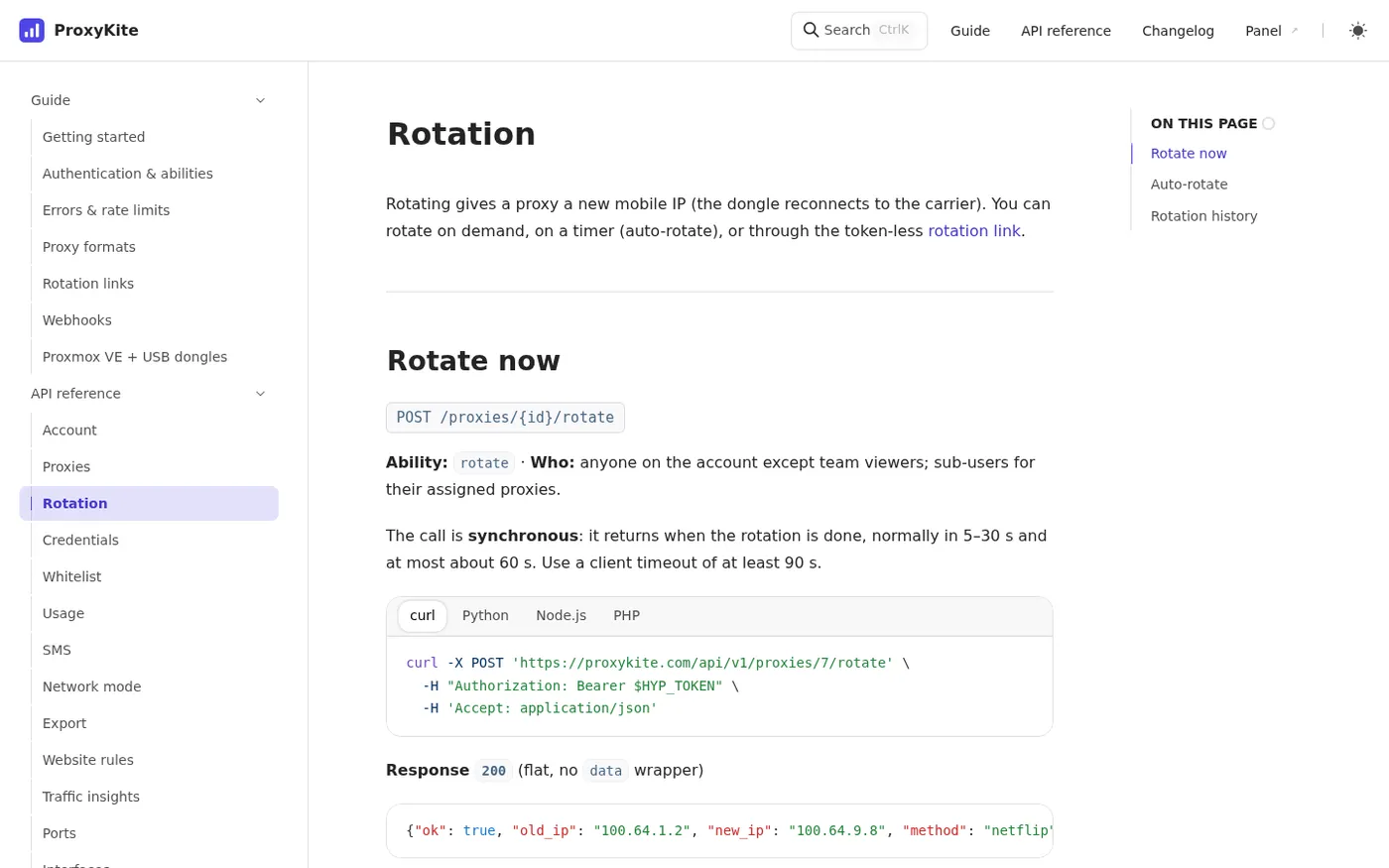
ProxyKite’s rotation endpoint is a synchronous POST. Send the proxy ID in the path and a bearer token in the Authorization header. Use a longer read timeout for rotation than for an ordinary page fetch, then inspect the JSON response:
import os

import requests


def rotate_proxy(proxy_id):
    token = os.environ["PROXYKIT_TOKEN"]
    url = f"https://proxykite.com/api/v1/proxies/{proxy_id}/rotate"
    response = requests.post(
        url,
        headers={
            "Authorization": f"Bearer {token}",
            "Accept": "application/json",
        },
        timeout=(10, 90),
    )
    response.raise_for_status()
    result = response.json()
    if not result.get("ok"):
        raise RuntimeError(f"Rotation was not accepted: {result}")
    return result


rotation = rotate_proxy(proxy_id=7)
print(rotation["old_ip"], "->", rotation["new_ip"])
The token is for the ProxyKite API, not for the proxy’s user/password authentication. Keep both sets of credentials separate. The rotation API reference lists the required ability and response fields.
To rotate after every batch, close the old Session, call the rotation endpoint once, and create a fresh Session. Closing the Session drops its pooled connections so the next batch establishes new connections through the same proxy endpoint:
from itertools import islice


def batches(items, size):
    iterator = iter(items)
    while batch := list(islice(iterator, size)):
        yield batch


urls = [
    "https://example.org/page-1",
    "https://example.org/page-2",
    "https://example.org/page-3",
]

for batch in batches(urls, size=25):
    with make_session(proxies) as session:
        for url in batch:
            response = session.get(url, proxies=proxies, timeout=(10, 30))
            response.raise_for_status()
            print(response.url, response.status_code)

    result = rotate_proxy(proxy_id=7)
    print(f"Rotated {result['old_ip']} -> {result['new_ip']}")
Do not rotate once per request unless the destination and your carrier plan are designed for that pattern. A batch size should reflect the job, rate limits, and the amount of state you want to keep together. For the networking model behind mobile IP changes, see how 4G IP rotation works.
Step 6: Verify the route before running a large job
Why: A small IP check catches a bad port, wrong credentials, or an accidentally bypassed proxy before you spend time on the full workload.
Run one request through the proxy and print the route returned by the test service:
def check_route(proxies):
    with make_session(proxies) as session:
        response = session.get(
            "https://httpbin.org/ip",
            proxies=proxies,
            timeout=(10, 30),
        )
        response.raise_for_status()
        return response.json()["origin"]


print("Current egress:", check_route(proxies))
For a rotation test, record the value before the API call, rotate once, then call check_route with a newly created Session. Also log the API’s old_ip and new_ip fields. Do not log proxy passwords or bearer tokens.
Common errors and fixes
| Symptom | Likely cause | Fix |
|---|---|---|
407 Proxy Authentication Required | Credentials are missing, wrong, or not URL-encoded. | Rebuild the proxy URL with quote(..., safe=""); check the username, password, host, and port. |
InvalidSchema or “proxy URL must include a scheme” | The value is host:port instead of a complete URL. | Use http://host:port, socks5://host:port, or socks5h://host:port. |
Missing dependencies for SOCKS support | The optional SOCKS dependency is not installed in this interpreter. | Run python -m pip install "requests[socks]" with the same python command that runs the script. |
| HTTPS requests resolve the wrong place | socks5 performs DNS locally. | Use socks5h when DNS should be resolved by the proxy. |
| The script hangs | No timeout was supplied, or the timeout is too generous for the job. | Set a connect/read tuple such as timeout=(10, 30) and use a separate longer timeout for rotation. |
| A Session appears to ignore its proxy | Environment proxy variables override Session-level settings. | Pass proxies=proxies on each request, as shown above. |
| A rotation request is retried or duplicated | A POST was mounted behind a broad retry policy. | Keep rotation outside the fetch Session and call it once; retry only after confirming the operation is safe. |
If a Huawei E3372 is the source of your proxy, confirm it is in HiLink mode and that the box can reach the internet before debugging Python. The Huawei E3372 proxy guide covers that hardware path.
FAQ
How do I set a proxy in Python Requests?
Create a dictionary with http and https keys, then pass it as proxies=proxies to requests.get() or session.get(). The values must be complete proxy URLs, including http://, socks5://, or socks5h://.
How do I use a username and password with Requests proxies?
Put the credentials in the proxy URL as scheme://user:password@host:port. Percent-encode both values first, especially when they contain @, :, /, or #, and keep the finished URL out of source control.
What is the difference between socks5 and socks5h in Requests?
requests[socks] enables both schemes. socks5 resolves the destination hostname on the client, while socks5h asks the proxy to resolve it. Use socks5h when the destination DNS lookup should follow the proxy route.
How do I rotate a proxy while using Python Requests?
Finish a batch, close the current Session, call the provider’s rotation endpoint, and create a new Session for the next batch. With ProxyKite, the rotation call is POST /api/v1/proxies/{id}/rotate with a bearer token; inspect the returned old_ip and new_ip values.
Why should every Requests call have a timeout?
Requests does not apply a default timeout, so a connection or response can wait indefinitely. A tuple such as (10, 30) separates connection setup from response reading and makes worker behaviour easier to control.