
To understand how to keep prepaid sim active in a 4G proxy farm, separate plan validity, account balance, and non-usage rules first. A dongle can still be plugged in while the SIM has no usable data, has an expired service plan, or is approaching operator deactivation. The reliable fix is a register for every SIM, a renewal buffer, and alerts that reach you before a port goes quiet.
What “active” means for a proxy-farm SIM
There are three different conditions to track. Treating them as one expiry date is how farms lose working ports silently.
| Condition | What it controls | What you should record |
|---|---|---|
| Service validity | Whether the operator’s voice, SMS, or data service is available under the plan | Plan name, start date, expiry date, and renewal option |
| Main account balance | Talk-time or retention balance that may be used for operator charges | Current balance, minimum balance, and last deduction |
| Data balance or quota | How much packet data the dongle can use | Remaining data, reset date, and a low-data threshold |
| Non-usage status | Whether the operator considers the number inactive | Last qualifying call, SMS, data session, or other activity |
An expired data pack is not always the same as a deactivated SIM. Conversely, a SIM with account balance can still be unusable if its service validity has ended or the carrier has applied a restriction. Your proxy software can expose the dongle and its port correctly; it cannot renew a carrier plan or override a SIM restriction.
For an operator-managed farm, the safest policy is to renew before the published expiry date and keep the SIMs active under the carrier’s normal terms. Do not generate artificial calls, messages, or traffic merely to defeat an inactivity rule. Use the operator’s permitted recharge, account, and usage methods.
Validity, data balance and inactivity: three separate clocks
Think of each SIM as having three clocks:
- The plan clock ends when the recharge’s service validity ends. It may stop outgoing service, incoming service, data, or some combination, depending on the plan.
- The data clock tracks the quota available to the dongle. A valid plan can still have zero data remaining.
- The inactivity clock measures qualifying usage under the operator’s published rules. A SIM sitting in a powered dongle is not automatically “used”.
This distinction matters in a proxy farm. If the data quota is exhausted, the proxy may fail immediately. If the plan expires, the SIM may remain visible in the HiLink interface but no longer establish a data session. If non-usage deactivation is approaching, a later recharge may require reactivation or customer support.
Keep a renewal buffer. For example, if a plan expires on the 20th, set an internal renewal date on the 15th. The five-day buffer gives you time to fix a failed payment, a missing SMS confirmation, a disconnected dongle, or an operator-side verification request without losing a production port.
Typical carrier rules: check yours and date your notes
Carrier rules are not universal. The examples below are published rules checked on October 31, 2026; they are useful for understanding the shape of the problem, not for predicting another operator’s exact cutoff.
India’s TRAI Telecom Consumer Protection (Sixth Amendment) Regulations define activity to include incoming or outgoing voice or video calls, outgoing SMS, a data session, or value-added service usage. They set a minimum 90-day period before a prepaid connection can be deactivated for non-usage, allow an automatic number retention deduction of up to ₹20 to extend the period by 30 days, and provide at least 15 days for reactivation after deactivation. The operator must communicate which activities count for its service.
Jio’s published non-usage policy says that no voice or video calls, outgoing SMS, data usage, or value-added service usage for 90 days or more can lead to deactivation at its discretion. Its page also describes a ₹20 automatic deduction when the main balance is above ₹20, a 30-day extension, and reactivation within 15 days subject to the stated payment and re-KYC conditions.
Vi’s consumer charter describes a 15-day grace period after limited-validity expiry, a 90-day no-usage condition, and a ₹20 automatic number retention process where the balance qualifies. The same document says the exact no-usage activities and service treatment are operator terms, so copy the current wording for each SIM group into your register.
The practical rule is simple: record the operator, circle or country, plan, and source URL beside every policy note. Never use a generic “90-day expiry” formula for a whole farm.
Step 1: Create a SIM register before you add more dongles
Why: You cannot renew what you cannot identify.
Create one row per physical SIM, not one row per USB hub. Use a stable internal ID that stays with the dongle even if you move it to another Raspberry Pi.
| Field | Example |
|---|---|
| Dongle ID | PK-014 |
| SIM number | Masked in shared reports; full number in restricted storage |
| Operator and region | Operator name, country, and service area |
| Registered owner | You or your company, matching the carrier record |
| Plan and service expiry | Plan name, expiry date, timezone |
| Main balance | Last confirmed balance and date checked |
| Data remaining | Quota, reset date, and low-data threshold |
| Last qualifying usage | Date, type, and source of the event |
| Last successful data session | Timestamp from the dongle or dashboard |
| Next action | Recharge, investigate, or no action |
Store the full SIM number and account details in access-controlled storage. The operations view can show a masked number, dongle ID, expiry date, and status. Avoid putting SIM numbers, API tokens, or message content in a public spreadsheet or a chat channel.
Actions: Add all current dongles, then sort the register by the earliest of service expiry, data reset, and your internal renewal date. Give each row an owner so a missed alert has a human follow-up.
Success looks like: A technician can identify a silent proxy port, find the physical dongle, see which SIM is inside it, and know the next permitted action without opening a carrier account at random.
Step 2: Confirm the carrier’s validity and inactivity rules
Why: The cheapest recharge is not useful if it does not extend the service you need.
For each operator, save the current prepaid terms and answer these questions:
- Does the selected recharge extend service validity, data only, or both?
- What happens to incoming calls and SMS after plan expiry?
- Which events count as usage for non-usage deactivation?
- Does the operator use an automatic number retention deduction?
- What is the reactivation window and process?
- Are commercial or machine-to-machine uses restricted by the plan?
Do not assume that receiving an SMS resets the inactivity clock. TRAI’s regulation requires certain activities to count but allows providers to specify additional details, and the operator’s own terms tell you how it applies them. For a proxy farm, a normal data session or an authorised recharge is easier to audit than an undocumented “keep alive” trick.
Actions: Add the policy URL and the date checked to your register. Choose a plan that supports your actual data use and business terms. Put a calendar reminder several days before validity expiry even if your carrier sends its own reminder.
Success looks like: Every SIM has a documented plan, a documented expiry date, and a documented answer for what happens next if you do nothing.
Step 3: Check balance and validity from the dongle
Why: A live USB connection only proves that the computer sees the modem. It does not prove that the SIM can use data.
Use the operator’s official balance or validity method. Depending on the carrier and firmware, this may be a USSD code in the HiLink interface, an operator SMS keyword sent to an official short code, the operator’s account portal, or a carrier app. Keep the exact code and expected reply in the register; codes differ by operator and country.
For a Huawei E3372 HiLink setup, check the modem’s web interface first. Confirm that it is registered on the network, has signal, and has an active data connection. Then run the carrier-approved balance or validity check. If the HiLink firmware does not expose USSD, use its SMS function or check the carrier account through an authorised channel rather than guessing a code.
Record four results separately:
- service validity and expiry date;
- main balance or retention balance;
- data balance and reset date;
- the timestamp and text of the operator’s confirmation.
Never paste message contents, a full SIM number, or an account password into a diagnostic ticket. A balance reply is operational data; protect it like an account notification.
Actions: Perform one manual check on a known-good dongle. Repeat it on a SIM nearing expiry. Compare the operator reply with what the register says, then update the row and its next-action date.
Success looks like: You can distinguish “validity expired”, “data quota exhausted”, “balance too low”, and “modem has no network” without swapping hardware.
Step 4: Route SMS replies into an auditable alert path
Why: Carrier reminders, balance replies, and reactivation notices often arrive by SMS, so an unattended farm needs a way to review them.
ProxyKite can expose the SMS inbox for a dongle and send SMS from it. Its SMS API documentation describes paged received messages and an inbox sync from the dongle. Use the API to collect operator replies into your normal monitoring workflow, then alert on phrases such as “validity”, “recharge”, “balance”, “deactivated”, or “expiry” after testing the wording used by your carrier.
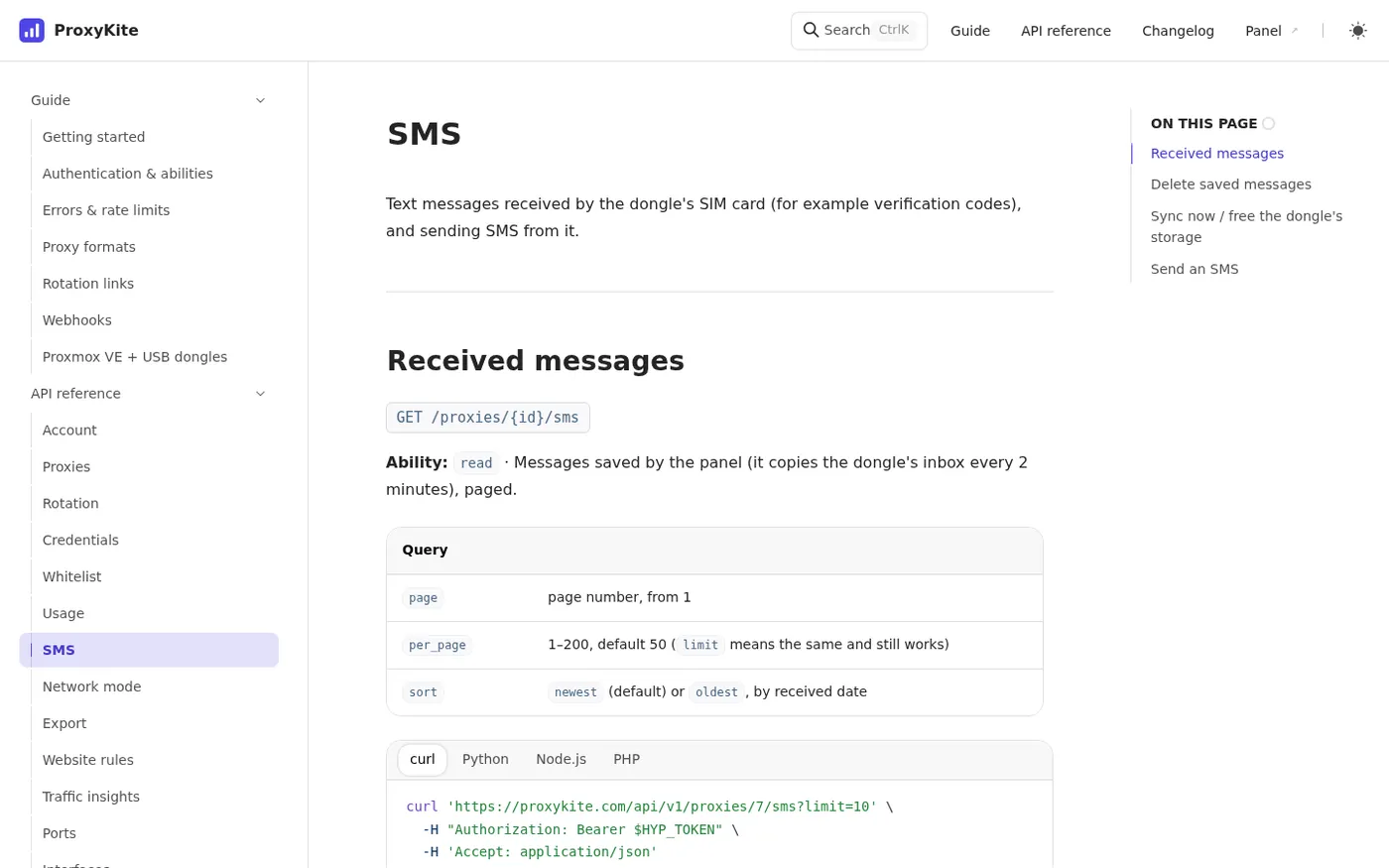
A minimal read-only check looks like this:
export PROXY_ID="replace-with-dongle-proxy-id"
export PK_TOKEN="replace-with-api-token"

curl "https://proxykite.com/api/v1/proxies/${PROXY_ID}/sms?limit=50" \
  -H "Authorization: Bearer ${PK_TOKEN}" \
  -H "Accept: application/json"
Do not hard-code the token in a script committed to a repository. Store it in your secret manager or protected environment, restrict who can read SMS, and retain only the message fields your operations process needs.
For each dongle, alert at two levels:
- Reminder: validity or data threshold is approaching your internal buffer.
- Action required: the latest SMS indicates expiry, failed recharge, low retention balance, reactivation, or a data restriction.
Use a webhook or Telegram alert for the on-call operator, and keep a daily digest for the farm owner. Alerts should identify the dongle ID and masked SIM number, not expose the entire message to a large channel.
Success looks like: An operator can see the carrier notice, identify the affected dongle, and update the register without logging into every modem manually.
Step 5: Schedule renewals and keep a human approval step
Why: Automation should find due SIMs; it should not blindly recharge the wrong number or select the wrong plan.
Run a daily job that checks the register for these conditions:
- Service expiry is inside the renewal buffer.
- Data remaining is below the farm’s threshold.
- No successful data session has been recorded within the expected operating window.
- The last balance check is older than your review interval.
- An SMS alert has not been acknowledged.
The job should create a queue with dongle ID, SIM, operator, reason, current plan, and suggested next action. A person then confirms the number and plan in the carrier’s authorised recharge channel. After the recharge, record the transaction reference, new validity, new data allowance, and confirmation SMS.
For a small farm, a weekly review plus expiry reminders may be enough. For a larger farm, check status daily and review the exception queue every business day. Keep one spare, already-authorised replacement plan or SIM only if that fits your carrier terms and registration process; do not move SIMs around casually because your register and network assumptions will become wrong.
Success looks like: Renewals happen before the buffer date, every payment has an owner and reference, and a failed recharge becomes an explicit exception instead of a silent failure.
Step 6: Verify the proxy after every renewal
Why: A successful recharge does not prove that the modem re-established data or that the proxy port is healthy.
After a plan renewal or SIM intervention:
- Confirm the dongle is registered on the carrier network.
- Confirm the modem has an active data session.
- Test the proxy with a small request to a service you are authorised to access.
- Check that the public IP is the one you expect for that SIM.
- Confirm that the dashboard reports traffic and that the port is reachable.
- Update the last successful data session and new expiry date in the register.
You can use the ProxyKite getting-started guide for the install and proxy format guide for a correctly formed test request. If you operate rotating ports, test the rotation workflow separately from SIM validity; rotation links solve IP-change workflows, not carrier billing or deactivation.
Success looks like: The SIM has current service, the modem has data, the proxy answers, and the register has evidence for all three.
Troubleshooting a SIM that looks active but does not proxy
The modem is visible, but there is no data session
Check service validity and data balance first. Then check APN settings, signal, and whether the operator has barred data. A powered USB connection and a green modem light do not confirm that packet data is authorised.
Data works briefly, then stops
Compare the time of failure with the plan expiry and data reset fields. If the quota is exhausted, renew or change the plan through the carrier’s permitted process. If the dates look correct, check whether the SIM has entered a non-usage, commercial-use, or account-verification state.
The carrier SMS never appears in the dashboard
Check whether the modem’s inbox has the message, whether SMS storage is full, and whether the API token can read that proxy. ProxyKite’s SMS documentation covers inbox sync and deleting saved messages; after clearing only messages you are allowed to remove, send a new test SMS and confirm it appears.
A recharge succeeded but the port is still offline
Wait for the operator confirmation, then reconnect the data session or restart the modem using your normal maintenance procedure. Verify the APN and run a small authorised proxy request. If the SIM is barred or needs reactivation, contact the operator rather than repeatedly recharging.
Several dongles fail together
Check the powered USB hub, upstream connection, and box network before changing SIM records. A shared hardware or internet problem can look like many expired prepaid plans at once. See the guide to monitoring 4G dongles with Telegram and webhooks and the powered USB hub guide for broader farm checks.
Keep SIM ownership and usage compliant
Use SIMs registered to you or your company, with the identity and business details required by the carrier and local law. Follow the operator’s acceptable-use terms, data-plan restrictions, SMS rules, and recharge process. Do not use a proxy farm for fraud, spam, credential attacks, bypassing platform bans, or other prohibited activity.
This also makes troubleshooting easier. When the registered owner, plan, number, and dongle are documented together, the carrier can verify the account and your team can act on a real record instead of guessing which SIM is inside which stick.
FAQ
How long can a prepaid SIM stay inactive?
There is no single worldwide answer. In India, TRAI rules provide a minimum 90-day non-usage period before a prepaid connection can be deactivated for non-usage, while operators can publish longer periods and their own qualifying activities. Check the current terms for the exact SIM and keep a renewal buffer.
Does a data recharge keep a prepaid SIM active?
A recharge may extend service validity, add data, or do both, depending on the plan. It may not resolve a number that has already been deactivated or requires reactivation. Confirm the new validity and data allowance in the operator’s confirmation message or account page.
Does receiving an SMS count as SIM usage?
Do not assume it does. TRAI’s rules define certain activities and allow service providers to specify additional details, while individual carrier terms can differ. Treat incoming SMS as a useful monitoring signal, not as a guaranteed way to reset the inactivity clock.
Can I use a USSD code from a 4G USB dongle?
Some HiLink firmware and carrier combinations expose USSD; others do not. If it is unavailable, use the operator’s authorised SMS or account channel and record the exact method in your register. Never guess a code or automate a message that the carrier does not permit.
What does ProxyKite do when a prepaid SIM expires?
ProxyKite manages the software and cloud routing for your own dongles and SIMs; it does not renew carrier plans or supply SIMs, data, or bandwidth. Its SMS, webhooks, Telegram alerts, and dashboard can help you notice a carrier message and route it to the person responsible for renewal.