
The social proxy alternative for people who already have 4G SIMs is to run the modem yourself and keep control of the connection. ProxyKite turns a Huawei E3372 HiLink dongle and a Raspberry Pi or Linux box into an HTTP and SOCKS5 proxy, with a flat $9 per active dongle each month.
Quick comparison
| Option | What you own | Monthly model | Rotation and access | Best fit |
|---|---|---|---|---|
| ProxyKite | Your dongle, SIM, data plan, and resulting mobile IP | $9 per active dongle per month, with no per-GB charge | On demand, rotation link, or timer from 60 seconds to 7 days; HTTP and SOCKS5 | Operators who already have SIMs and want ownership, local coverage, or resale control |
| The Social Proxy | A rented provider-managed modem endpoint | Provider plan varies by location and plan; confirm the current checkout price | Dedicated modem-style access and provider-managed rotation | Buyers who want a ready-made endpoint without sourcing hardware |
| DIY scripts and port forwarding | Your hardware and a collection of scripts | Software may be free, but you operate the networking and management layer | Depends on your scripts, carrier, and network path | Engineers building every part themselves |
The important distinction is not just the proxy protocol. It is who owns the modem, who chooses the SIM, and who pays the recurring network bill. ProxyKite is the practical choice when those assets are already yours.
What The Social Proxy sells, checked October 18, 2026
The Social Proxy’s public materials position the service around 4G and 5G mobile proxies delivered through provider-managed modem hardware. Availability is organised around the provider’s locations and plans, so the country or city you can use depends on what is listed when you order.
That model removes the hardware work. You do not need to buy a USB modem, prepare a powered hub, install a box, or maintain the SIM connection. You pay for access to an endpoint that somebody else operates.
It is a sensible rental model when you need a managed location and do not have local hardware or SIMs. It is less suitable when your business already has SIMs in the countries you need, because you are still paying a provider to supply a modem that you could operate yourself.
The two models should not be described as the same product:
- A rented endpoint gives you access to a provider’s modem and carrier connection.
- A ProxyKite installation exposes your own SIM-backed connection through cloud routing.
- A public mobile IP can still change because the carrier controls address assignment. “Dedicated” should mean dedicated modem or SIM operation, not a promise that a carrier IP never changes.
Renting a dedicated modem versus running your own
The choice becomes clearer when you separate convenience from control.
| Question | Rented modem service | Your own dongle with ProxyKite |
|---|---|---|
| Who supplies the modem? | The provider | You |
| Who supplies the SIM and data plan? | The provider or its upstream arrangement | You |
| Can you use a local carrier you already know? | Only if the provider offers it | Yes, subject to your carrier’s terms and coverage |
| Where does the traffic exit? | The provider’s listed location | The location of your SIM and mobile network |
| Do you need a public static IP or inbound port? | Usually no client-side setup | No; the box needs outbound internet access |
| Can you resell or separate access for customers? | Depends on the provider’s terms | ProxyKite includes sub-users, quotas, expiry dates, and white-label options |
| Who operates the physical connection? | The provider | You |
Running your own proxy does add physical work. You must choose a suitable SIM, power the hardware correctly, and place the dongle where it has usable signal. That is a good trade when local coverage matters or when you plan to operate more than one proxy.
For the hardware side, start with the 4G proxy farm setup guide and the guide to building your own mobile proxy. A powered USB hub becomes important as the number of dongles grows; do not treat a cheap unpowered hub as a fleet power system.
ProxyKite: the Social Proxy alternative for your own SIMs
ProxyKite is software plus cloud routing. It does not sell mobile IPs, SIM cards, dongles, data plans, or bandwidth. You bring the hardware and connectivity, then the software makes each active dongle available as a usable proxy.
The reference setup is a Huawei E3372 HiLink dongle connected to a Raspberry Pi or another Linux box. Similar Huawei HiLink models may work, but the E3372 is the reference stick for the documented setup. The box only needs outbound internet access, so you do not need to expose a port from your home or office router.
Each active dongle can provide:
- HTTP and SOCKS5 access, with shared or split ports.
- Username-and-password or IP-whitelist authentication.
- On-demand, link-based, or scheduled IP rotation.
- SIM inbox for carrier messagesing from the connected SIM.
- Daily, weekly, or monthly bandwidth limits.
- Live traffic insights and website allow/block rules.
- Webhooks, Telegram alerts, a web terminal, and export formats for proxy lists.
The flat licence is US$9 per active dongle per month. Traffic has no per-GB charge from ProxyKite; it uses the data plan on your SIM. Taxes are added at checkout, and the licence is billed monthly by Paddle.com. If you operate 50 or more dongles, ask about volume pricing through contact.
This is also the more useful model for a reseller. You can create sub-users, assign proxies, apply quotas and expiry dates, and use white-label options. For a broader business view, see how to start a mobile proxy business.
How ProxyKite turns a dongle into a dedicated proxy
The setup is a short path from a physical SIM to a cloud-routed endpoint:
- Prepare the box. Use a Raspberry Pi or Linux computer with outbound internet access. The official Raspberry Pi getting-started documentation covers boot media, power, networking, and headless SSH setup.
- Insert the SIM into the HiLink dongle. Confirm the SIM is active and permitted for the intended use. Keep carrier and local telecom rules in scope.
- Connect the dongle to the box. Use direct USB for a small setup and a powered hub for multiple dongles. Allow enough airflow around the hardware.
- Run the ProxyKite installer. The getting started guide walks through connecting the box and registering the dongle.
- Export the proxy credentials. Use host, port, username, and password in your browser, scraper, ad-verification tool, or API client.
- Test the exit. Request an external IP through the proxy, check that the country matches the SIM’s network, and make a small authenticated request before adding production traffic.
Success means the dongle is online, a proxy port is reachable, authentication works, and a test request returns through the mobile connection. You should not need to configure port forwarding on the upstream router.
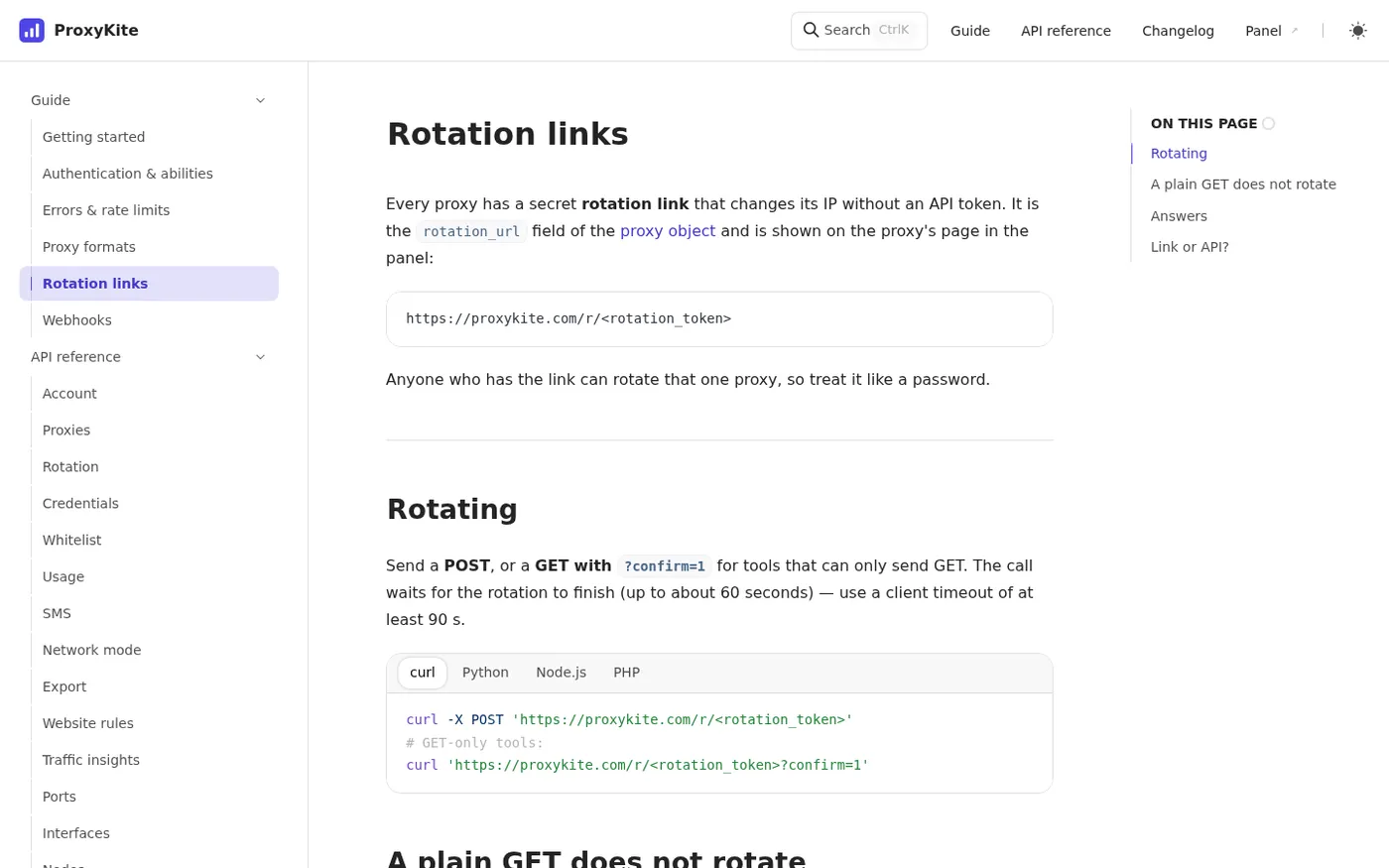
Rotation control: on demand, link, or timer
Rotation is where an owned modem is more flexible than a generic “rotating proxy” label suggests. You choose when to ask for a new carrier address rather than handing every request to an automatic pool.
ProxyKite supports three modes:
- On demand: rotate from the dashboard or API when a workflow reaches a clean boundary.
- Rotation link: call a unique link from a script, scheduler, or monitoring job.
- Timer: set a period from 60 seconds to 7 days.
A sticky option is available when a workflow needs to keep the same address for longer. A rotation request returns the old and new IP values, which makes it easier to log the change and associate a test result with the correct exit.
The rotation links guide shows the link-based flow. Use it for legitimate work such as checking your own social accounts, verifying ads in a target market, testing regional storefronts, or monitoring prices at a reasonable request rate. Rotation is a control mechanism, not permission to evade a website’s rules or carrier terms.
Monthly cost: rented versus owned
The right calculation is the recurring service fee plus the network cost that you would pay either way.
| Example | Rented dedicated modem | ProxyKite with your hardware |
|---|---|---|
| One proxy | Provider’s current location-specific monthly fee | $9 licence + your SIM’s data-plan cost |
| Ten proxies | Ten provider-managed endpoints at their current plan rates | $90 in licences at list price + ten SIM/data-plan costs |
| Fifty or more | Provider quotation or current plan rates | Contact ProxyKite for volume pricing; SIM and hardware costs remain yours |
With ProxyKite, the licence cost is predictable before you choose a data plan. You also keep the hardware and can move a SIM between supported equipment when your operating plan changes. Your true total still includes dongles, the Raspberry Pi or Linux box, powered USB hardware, SIM plans, electricity, and your time.
That last point matters. Owning a proxy is not the same as getting free bandwidth. ProxyKite does not charge per gigabyte, but the carrier’s data plan is still your responsibility. Choose a plan that matches the traffic you expect and follow the carrier’s terms.
How to choose the right alternative
Choose the ProxyKite model when most of these statements are true:
- You already have, or can legally obtain, SIMs in the locations you need.
- You want to own the modem and control how it is used.
- You need manual rotation instead of an opaque shared pool.
- You want HTTP and SOCKS5 endpoints without fighting CGNAT or inbound firewall rules.
- You may need sub-users, white-label access, quotas, or an API later.
- You are comfortable operating a Raspberry Pi, Linux box, USB hub, and SIM fleet.
A managed rental is worth comparing when you specifically need a provider-supplied location and do not want to source hardware. Verify the exact location, protocol, rotation method, data policy, and current monthly fee before ordering. Do not compare a provider-managed modem with ProxyKite’s $9 licence without adding your own SIM and hardware costs to the calculation.
If you are planning multiple devices, the mobile proxy business guide explains the operational questions around pricing, quotas, and resale. Start with one dongle, verify the carrier path, then expand the hardware only after the traffic pattern is understood.
Verdict
The Social Proxy is a rental option for buyers who want a provider-managed dedicated modem in an available location. ProxyKite is the stronger alternative for operators who already have local SIMs and want to own the connection, choose the rotation event, and pay a flat $9 per active dongle instead of a per-GB proxy bill.
The decision is simple: rent when you need someone else to supply the modem and location; use ProxyKite when the SIMs, hardware, and operating control are part of your business. Contact ProxyKite to discuss a setup or a fleet of 50 or more dongles.
FAQ
Is ProxyKite a direct The Social Proxy replacement?
It is an alternative model, not the same inventory. The Social Proxy rents provider-managed mobile endpoints, while ProxyKite software routes your own SIM-backed dongles through the cloud.
How much does ProxyKite cost per mobile proxy?
The licence costs US$9 per active dongle per month, with no per-GB charge from ProxyKite. You separately pay for the SIM’s data plan and provide the dongle, box, power, and other hardware.
Can I rotate a 4G proxy only when I need to?
Yes. ProxyKite supports on-demand rotation, a rotation link, and timers from 60 seconds to 7 days, with a sticky option. The rotation-links guide shows how to trigger it from a workflow or scheduler.
Does ProxyKite work behind CGNAT?
Yes. The box needs outbound internet access; you do not need a static public IP or inbound port forwarding. This is useful when the ISP or mobile connection does not give you a directly reachable address.
What hardware do I need to build my own 4G proxy?
The reference setup is a Huawei E3372 HiLink dongle, a compatible SIM, and a Raspberry Pi or Linux box. Add a powered USB hub for multiple dongles, and plan for adequate power, cooling, signal, and data capacity.